Wondering about the best VCR for FM RF Capture? Somewhere along the way, “doing captures properly” picked up a reputation for needing a rare, immaculate S-VHS deck — the kind that turns up on auction sites at a thousand dollars or more, snapped up before you’ve finished reading the listing. There’s a second misconception alongside this, that you need an inflated priced 500USD DdD to do the job properly. I made this mistake myself. The DdD is a genuinely capable device, but it’s the wrong device for tape as it requires extra fiddly audio work. If you want the higher bitrate of the DdD, get the MISRC instead.
If you’ve put off RF capture because you were waiting to win that lottery, here’s the part that ought to lift the weight a bit: that fear is mostly misplaced.
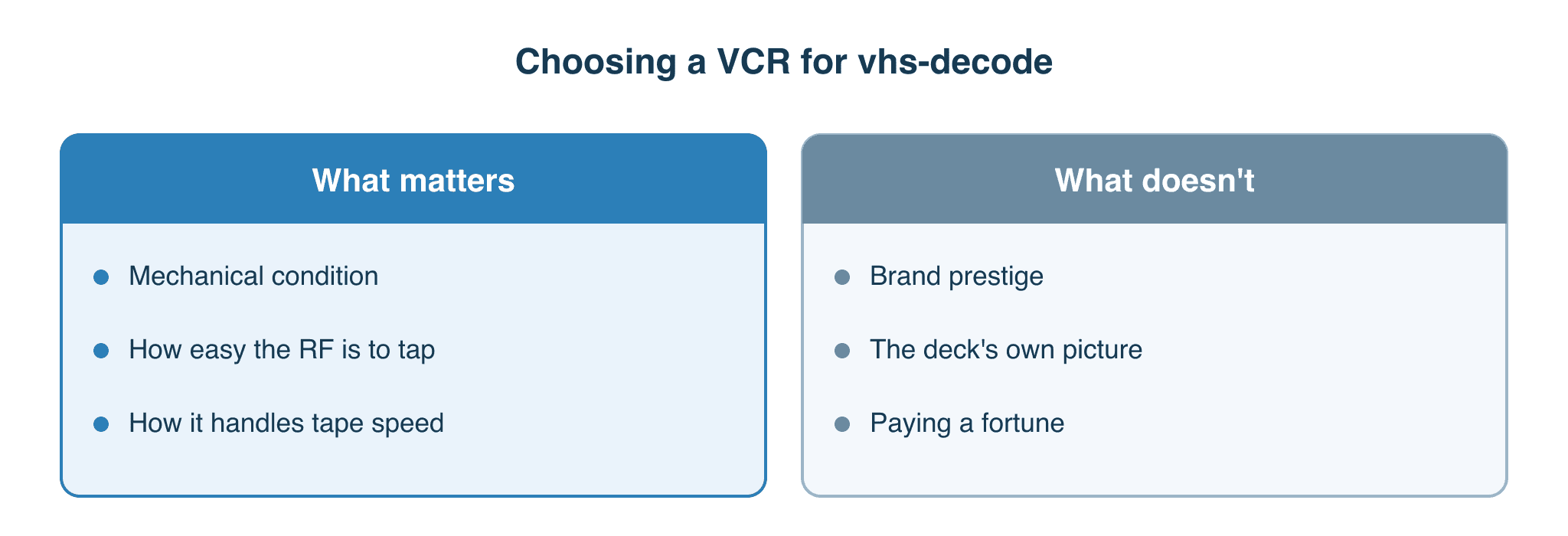
The reason is simple once you see it. RF capture takes raw FM signal coming straight off the tape heads, before the deck’s own electronics get to touch it. Everything that makes one deck’s picture look “better” than another’s happens after that tap point. So the deck you need is far more ordinary than the legend suggests, almost any working VCR can do the job. What actually matters is a shorter, more practical list and that’s what I want to walk through here.
Why the deck matters less than you’d think
A normal VCR is a small factory of signal processing. Once the FM signal leaves the heads, the deck demodulates it, runs it through a comb filter, separates luminance from chroma, and then — depending on how fancy the deck is — sharpens it, hits it with digital noise reduction, and possibly passes it through a time base corrector. By the time a picture reaches the deck’s output sockets, every one of those stages has had its say.
RF capture skips the lot. You’re tapping the FM signal before demodulation, so none of that processing is in the path. That’s the whole point of the technique, and it’s covered in more depth in how vhs-decode actually works. The practical upshot is the part people find hard to believe at first: a deck’s picture quality is irrelevant to RF capture. Whether its comb filter is brilliant or rubbish, whether its DNR is gentle or heavy-handed — none of it touches the signal you’re recording, because you’re recording the signal that arrives before any of it runs.
Which raises a fair question: if the deck’s picture quality doesn’t matter, what does? Two things — and neither is the name or the price tag on the front. The next two sections take them in turn.
What still matters, part one: mechanical condition
The tap can’t fix this: it can’t pick a signal up off a tape the deck can’t hold steady. Capture quality starts at the mechanical end — clean heads, a sound transport, and a head drum that hasn’t worn past the point of tracking the tape cleanly. If the deck can’t follow the tape, there’s nothing at the tap point worth recording.
First, a knot worth untying, because it trips up almost everyone: “S-VHS” is a tape format, not a quality grade. An S-VHS deck only matters if you’re capturing S-VHS tapes; for ordinary VHS, a plain VHS deck does the job just as well. The two ideas get tangled because the famous high-end decks — the prosumer Panasonics, the broadcast machines — mostly happened to be S-VHS. But those decks earned their name on conventional capture, where their picture processing and time base correction mattered, and RF bypasses exactly those parts. The community’s most experienced hands are candid that they’ve never found a clear RF advantage to the expensive decks; a clean mid-range deck holds its own. The only firm rule is the floor: very cheap, no-name decks give a worse RF signal. So “don’t use junk” holds — and you need S-VHS at all only if your tapes are S-VHS, in which case a working S-VHS deck will do, not a costly one.
There’s one more axis, and it’s tape speed rather than format or grade. Slow speeds are less forgiving to start with — on an LP or EP/ELP recording the tracks are narrower and more tightly packed, so tracking is harder and a tired transport shows its limits where a fresh one coasts. And many of those prized professional decks are SP-only: they won’t play LP or EP/ELP at all. So for long-play recordings, and a great deal of home-taped material is long-play, any decent consumer deck — S-VHS or plain VHS — is exactly what you want; the pricey pro machine simply won’t spin them. “Decent serviceable condition” is the real minimum bar; “best deck” only means anything once you know what your own tapes are.
What still matters, part two: how tappable it is
The second thing that varies deck to deck is how easy it is to actually get at the RF signal — both the strength of the signal at the tap point and how much soldering it takes to reach it. This is where brand reputation carries some actual substance… None of what follows is lab-confirmed; it’s the accumulated reports of people doing this between roughly 2020 and now.
Panasonic — the community benchmark
The late-90s Panasonic “K-deck” family — models like the NV-FS200, NV-HS950B, NV-FS88 and NV-HS800 — is the name that comes up most often as a reliable starting point. The draw, again, is transport quality and reliability rather than picture. They tend to have “bar style” jumper-wire test points that you can reach with clip leads or a quick solder joint, which keeps the work approachable.
For tapping one of these, the modern method is the René Wolf amplifier board (more on that just below) — it’s what most people fit now. The older, minimal alternative, still fine if you haven’t got an amp to hand, is a bare 10 µF capacitor on the tap point, which AC-couples past a DC bias and lets you run an RF capture and a conventional capture at once. The cap cleans up the coupling; it doesn’t boost the signal — lifting a weak signal is the amplifier’s job. One thing worth heading off either way: the TBC board on an HS1000 or FS200 does nothing for RF — an FS88 or HS800 without it works identically for RF, so you needn’t pay a premium chasing it. The thing to watch on these is ageing capacitors in the power supply, a well-known weak spot on this generation of Panasonic deck — the community’s working assumption is that an FS200 of this age likely needs recapping.
Sony — sometimes the easiest to tap, sometimes not
The community shorthand is that Sony is the easiest deck to tap, and there’s truth in it — but the catch is big enough that I’d rather state it carefully. The thing that makes a Sony easy is a row of plug-in DuPont header pins at the test points: where a deck has them, you connect with little or no soldering. The trouble is that plenty of Sony decks don’t have them. So “Sony is easiest to tap” really means “the particular Sony decks that carry the header are easiest to tap” — and from the outside you can’t always tell which is which. It’s a bit of a misnomer that has settled into the community’s collective memory and the wiki without ever quite getting corrected: people know it’s only-some-models, but the shorthand sticks and the documentation rarely catches up. So I’d treat the Sony name as a maybe rather than a promise — and the deck I’d point you to first is still a Panasonic.
The access really is model-by-model, sometimes revision-by-revision. The SLV-678HF is reported as easy to tap with a good signal-to-noise ratio; the very next revision, the 679HF, reportedly has no accessible HiFi RF tap at all. There’s a bigger trap underneath, too: some 2000s machines wearing a Sony badge were actually made by Samsung. Those units lack the DuPont headers and may have no HiFi RF test point — a useful tell people mention is the FCC ID, which on a Samsung-made unit tends to contain “A3L”. A Sony logo, in other words, settles nothing on its own. I have a lovely-looking SLV-EZ77 myself that I’ve yet to get going — a standing reminder that “nice Sony” and “tapped and working” are two different sentences. As with the older Panasonics, older Sonys can have failing electrolytic capacitors worth checking.
JVC — weaker at the tap, but no longer a write-off
JVC decks have a reputation for a weaker signal at the tap than the equivalent Sony or Panasonic. The old “avoid JVC” advice, though, predates the René Wolf amplifier becoming the routine way to tap — and with one of those in the path, a weaker JVC signal lifts cleanly to a perfectly usable level. It’s exactly the case the amplifier was built for, so I’d treat the blanket warning as out of date. One specific quirk is still worth knowing: some JVC models bleed HiFi audio into the video RF, which is its own thing to watch for rather than a reason to dismiss the brand.
Samsung and the no-names
Samsung machines — and the rebadged Sonys that are Samsung underneath — are reported as fine enough for video, though fiddly to tap for HiFi audio. Coverage here is genuinely thin, so I’d hold that loosely. The cheaper end is where I’d be most wary: a no-name deck (the rebranded Tevion, Orion and similar) reportedly gave noticeably worse results than a Sony fed through the exact same RF hardware. That’s the clearest sign the deck isn’t entirely neutral in this process, even if its electronics are bypassed.
On the “any deck works” versus “brand matters” argument, both camps are partly right and the reconciliation is straightforward. Almost any deck in serviceable condition can give a usable signal with the right capacitor or amplifier — but the floor isn’t zero, and some brands need more coaxing than others to get there. There’s no systematic, brand-to-brand SNR comparison to settle it; “40-plus dB black SNR” gets cited as a reasonable target, but the practical test is the one that always wins — look at the decoded output and judge it.
The HiFi audio gotcha
If you want HiFi audio out of a tape, the rule is unbendable: it takes a HiFi-capable deck to play it back at all, because the HiFi track is recorded by the spinning heads, not the fixed linear head. And for RF, the HiFi signal has its own separate tap point — it isn’t the same wire as the video RF.
That’s where the gotcha lives. Plenty of HiFi-capable decks have an awkward HiFi RF tap, or only expose a single channel, or have no accessible HiFi RF test point at all. A deck can play HiFi audio perfectly through its normal outputs and still be a pain — or impossible — to tap for HiFi RF. The only way to know before you commit is to check the service manual for that exact model and look for the HiFi RF test point.
The gotcha matters less than it first looks: you don’t have to tap the HiFi RF at all. You can take the audio straight off the deck’s RCA outputs and get a genuinely good result — that’s the route I use, captured in sync alongside the RF video. For mono and linear-stereo audio there’s no real reason to do anything else; the RCA outputs capture it cleanly. The dedicated HiFi RF tap earns its keep only at the top end, where it gives you that extra, crisp, “digital-sounding” HiFi decode for a source that’s worth the trouble. So if a deck turns out to be awkward or impossible to tap for HiFi RF, you’ve lost very little — the RCA outputs are a perfectly respectable plan B, and plan A for most material.
The linear audio surprise — newer isn’t always better
Here’s one that caught me out, and no spec sheet warns you about it. A lot of home recordings from the 1980s carry their sound on the linear track — the mono audio strip at the edge of the tape, read by a fixed head rather than the spinning drum. RF capture doesn’t touch that track at all (it’s reading the FM signal off the head drum), so linear audio is captured the conventional way, alongside the RF rather than through it. And the quality of that linear head varies enormously deck to deck — in a direction that runs opposite to what you’d guess.
I have a pair of Panasonic NV-HV62s — small, multi-region, stereo, relatively recent, lovely picture output, and I was pleased enough with the first that I went and bought a second. On 1980s mono recordings, though, the linear audio out of them is poor. The deck I’d tapped first, almost as an afterthought because I didn’t much care about it — a Philips DVP3050V VHS/DVD combo — turned out to be night and day better. Cicadas chirping, a stream bubbling over the rocks on a cattle farm: crisp and clear off the Philips, muffled off the “better” Panasonic. Same tape, same chain downstream.
There’s a reason for it, and the vhs-decode community has clocked the same pattern. As decks moved through the late 1990s and into the 2000s, manufacturers leaned everything onto HiFi audio and stopped caring much about the linear track — so linear quality on many newer decks regressed, in some cases to the point of being called abysmal. Certain late JVC decks (roughly 2002 onward) have a linear-audio fault of their own on top of that. So “newer, with less aged componentry” is a real advantage for the mechanics and the power supply — but it can quietly cost you on linear sound, which is exactly the sound a lot of older family tapes depend on.
It cuts the other way too, which is why I’m wary of any rule of thumb here. I have a JVC HR-S9850 — a newer S-VHS deck, exactly the sort of machine the spec sheet says ought to be excellent. I’ve not warmed to the way its tracking behaves, so it has sat untapped while easier decks did the work — a small reminder that a newer S-VHS deck isn’t automatically the better one. Yet its mono audio, once I’d recalibrated the audio head and fitted a new capstan in place of the worn-out one, is superb. Newer isn’t always better, then, and it isn’t always worse either: condition and calibration move a deck further than its age or model number do. I’ll probably tap that JVC soon, now it is behaving itself.
Two things follow. There’s no single best deck — the right one depends on what your tapes actually need, and a deck that’s wrong for one job can be ideal for another. And the combo VHS/DVD units that tend to get sneered at aren’t automatically a poor choice: mine taps cleanly once you know where to go, and its linear audio outclasses decks several rungs above it on paper. The reputation is a generalisation; the deck in front of you is the only thing that counts.
PAL, NTSC and what the format limits
The deck has to match the tape’s TV system at the mechanical and signal level. PAL and NTSC decks spin the tapes at different rates, so an NTSC deck can’t play a PAL tape, and vice versa — this isn’t a setting you can change. Most later 80s-to-90s PAL decks, however, did have SECAM/MESECAM and NTSC playback support, but as PAL60 or NTSC 4.43, not native NTSC 3.58.
Multi-system decks exist and play all regions natively, which is the simplest answer if your shelves are mixed, but that can be cost-prohibitive.
A small bonus worth knowing, by the later years, some decks shipped with multi-standard support that the badge and the manual never advertised, it had become easier for manufacturers to fit one “world” chipset than to maintain separate ones. You can often confirm it downstream rather than take it on trust, play an NTSC tape and watch what your monitoring chain locks onto. If a converter flips into NTSC 3.58 mode, the deck is genuinely reading and passing the NTSC signal off the tape, if it were faking a conversion you’d see a 525-line 4.43 converted PAL signal instead. One of my own supposedly PAL-only decks turned out to handle NTSC perfectly well this way.
One more format edge: an S-VHS tape can sometimes be RF-captured on a plain VHS deck, particularly one with SQPB (S-VHS Quasi Playback). On a deck that isn’t S-VHS compatible, you’ll typically get heavy colour and signal problems on the video while the audio comes through fine. It’s also fair to say S-VHS RF decoding in the software has historically lagged behind plain VHS, so it’s the more experimental corner to be working in.
How I’d actually buy the best VCR for vhs-decode
The vhs-decode wiki keeps a Tap List, and it’s an excellent resource — but it’s worth being clear about what it’s for. It’s a reference for a deck you already have opened on the bench in front of you, telling you where the tap points are on that model. It is not a buying guide. A model appearing on it doesn’t mean it’s the perfect deck to chase, and a model’s absence doesn’t mean it won’t work either. One exception worth knowing: later LG decks don’t have direct test points for HiFi audio.
So the call I’d make, especially first time out, is to start with the cheapest working deck I could find and learn the whole process on it — opening it up, finding the tap, getting a capture, judging the output. The skills transfer to any later deck, and you find out quickly whether RF capture is something you want to keep doing before you’ve spent real money. Where the budget stretches, buying a couple of candidates rather than one is a sensible hedge, because second-hand condition is always a gamble — the listing photos tell you almost nothing about head wear or a tired transport.
One more era-based trap to retire: don’t assume a tape has HiFi audio just because of when it was made. VHS tapes as late as 1999 can be linear-audio-only. The era tells you nothing definite, so it’s the tape and the deck in front of you that decide what you’ve actually got.
If you’re weighing this against a conventional capture chain rather than RF, the trade-offs are laid out in Part II on capture differences and the deck and gear choices in Part III, the buying guide. Different readers will land in different places here — the Impatient, the Libran and the Perfectionist each have a defensible answer, and none of them is wrong.
What a good deck can’t fix
The limits are where the actual expertise sits. RF capture won’t rescue a bad transport. If a deck can’t track a tape cleanly, no tap point, capacitor or amplifier downstream can manufacture a steady signal that wasn’t there to begin with. The mechanics come first, and nothing after them undoes a failure there.
No deck is magic, either. The expensive S-VHS machines aren’t a cheat code; they’re well-built transports, and a well-built transport in poor condition can perform worse than a humble deck that’s been looked after. Deck-to-tape alignment matters as much as the absolute quality of the deck — a fact that brand talk tends to bury. A particular deck and a particular tape that suit each other can beat a “better” deck that doesn’t, which is part of why the practical test — look at the decoded output — keeps winning over any spec sheet. The wider preservation field treats a working deck as a closing window rather than a luxury; bodies such as the International Association of Sound and Audiovisual Archives stress that the machines able to play ageing formats are finite, which is the real reason to capture while they still run.
None of this is settled, measured fact. It’s the pooled experience of the vhs-decode community over several years, and the people doing it don’t always agree. What they do agree on is this: get a serviceable deck, tap it properly, and judge it by what comes out…
A companion read
Choosing a deck is only one piece of the puzzle, and probably not the piece you started with — if you’re reading this, you’ve most likely already decided you want to try RF capture and sorted out what you’ll plug the tap into. The natural companion to this article is Capture hardware in 2026: it covers the capture cards and devices that take the RF off your tap, and it’s a good walk through the RF process itself. Worth reading alongside this one rather than after it.