Looking for the best way to capture VHS to digital? Quick answer: After two years testing every realistic option from a $30 USB capture stick to $4,000 frame syncs, the Domesday Duplicator with FM RF capture produces the best image quality and is the only method that future-proofs your archive — but it requires soldering and patience. For a hands-off “good enough” balance, an S-VHS deck with a built-in line TBC into a Canopus ADVC-100 sits in the 70–75% quality bracket without the workshop time. The cheap USB-stick + standard VHS deck combo most people start with is genuinely the worst option of all and produces results so poor most people blame the format. Real capture frames from each method below.
Based on first-hand testing of every method described below, on the same source tapes.
VHS Capture Method Comparison at a Glance
| Method | Quality | Cost (NZD) | Effort | Best for |
|---|---|---|---|---|
| Standard VHS deck + USB capture stick (Elgato etc.) | Poor — wrong resolution, compression artefacts, no TBC | $50–150 | Low | Nobody who cares about quality |
| Combo VHS/DVD recorder | Acceptable for casual viewing | $100–300 used | Low | Quick conversions for relatives |
| S-VHS deck (built-in line TBC) + Canopus ADVC-100 over FireWire | ~70–75% | $1,500–2,000 | Moderate | The “Libran” balance — quality without rabbit holes |
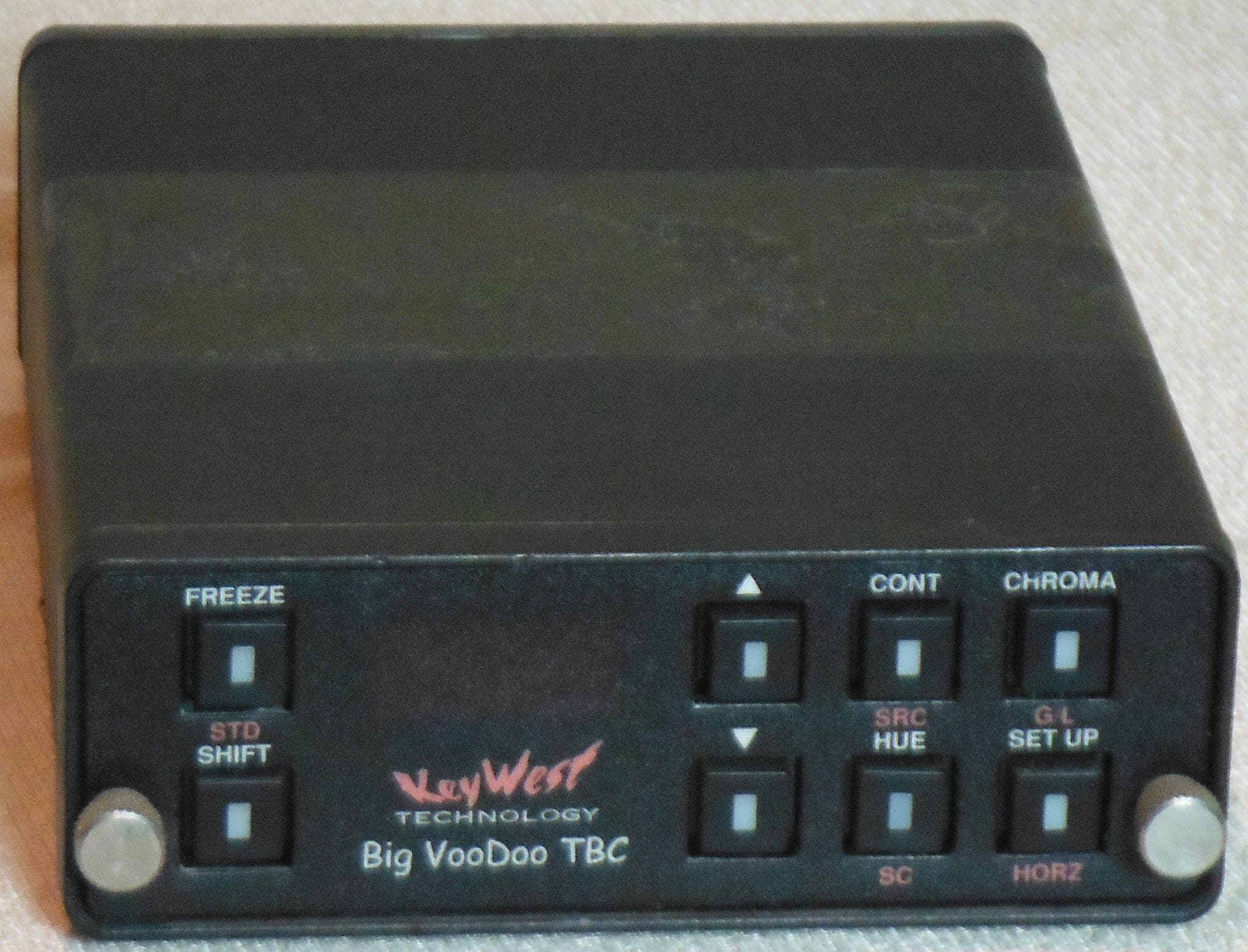
| S-VHS deck + external frame sync (e.g. BigVoodoo TBC 10) + Blackmagic SDI | ~85–90% | $5,000+ | Moderate | Best off-the-shelf legacy workflow |
| FM RF Archival via Domesday Duplicator (vhs-decode) | Highest available — preserves VBI, closed captions, future re-decoding | $80–600 + a donor player | High (soldering, learning curve) | Archivists, perfectionists, anyone preserving family tapes for the next generation |
| Proxy frame syncs (Datavideo DVK-100, Panasonic ES10/15) | Variable — adds noise or “digital” look | $100–500 used | Moderate | When real frame syncs aren’t available |
How to read this comparison
This page is the comparison companion to Part I (Overview and Storage). The idea is to show you, side by side, what different capture methods actually do to the picture, so you can decide what’s worth it for the tapes and the budget you have. It isn’t the last word. Capture is a deep, opinionated topic, and a more thorough shoot-out with many more device combinations is still to come. What follows are typical, representative differences, captured from the same source so the comparison is fair.
Where everyone starts, and why it disappoints
Almost everyone, myself included, starts down one of two paths, because they’re cheap and the gear is easy to find:
- A combo VHS/DVD recording deck, to copy the tape straight to a DVD.
- A VHS player into a cheap USB analog video adapter, using whatever software comes in the box.
That’s a perfectly logical place to begin. The manufacturers’ claims aren’t false, they just stay quiet about quality.
Option 1 isn’t actually a bad start, and it’s clearly better than option 2, provided you get a decent unit and you know how to rip the finished DVD into a modern file such as an MKV. A DVD recorder takes the tape’s existing limitations and layers MPEG-2 compression artefacts on top of them, so it’s a convenience choice rather than a quality one. I go into that comparison in VHS vs DVD. Hardly anyone keeps a DVD player connected now, so a disc on its own is a dead end for most families. Option 2 is the one that disappoints. If you’re like me, you’ll assume the rough result is just the VHS format showing its age. It isn’t. VHS can look close to DVD under the right conditions, although ageing personal tapes that have sat in a garage rather than a climate-controlled room will carry some loss you’ll either accept or clean up later.
The first sample below is a standard VHS player into the kind of USB capture device you might grab from PB Tech or eBay. Nothing is correcting the image here. There is no TBC in the player to straighten the jagged lines you can see across the top third of the frame, and no frame sync to stabilise and sharpen it. The cheap stick also bakes in heavy, non-adjustable compression that destroys fine detail on its own. On top of that, despite my selecting PAL, the Elgato refused to output 576i and forced the picture down to the American NTSC resolution of 480i. That’s a large loss of resolution before you’ve even started, and you can see it in the size difference between this frame and the next.

The other faults you’ll meet here are subjects that aren’t square or straight, faces that distort and shimmer, an annoying lean along the top of the frame, and assorted picture break-up. Most people assume this is just how the “rubbish” old format looks, and wonder how anyone ever watched it. The truth is that an old CRT television quietly handled all of this for us. The trouble comes from the conversion to digital, not from the tape.
This is also the point where a lot of people read up on the problem, find out there are ways to fix it, and then hit a wall of despair trying to buy a single modern box that solves it. I went through that wall more than once. The short version is that no such box exists in the way you’d hope — here’s why, before you spend anything.
The major preservation bodies reached the same conclusion about that compression long ago. The Library of Congress and the US Federal Agencies Digitization Guidelines Initiative both advise capturing video uncompressed, or with lossless compression if you must compress at all, never the lossy compression a cheap USB stick applies for you. That single decision, made silently inside the Elgato, is one reason why option 2 looks the way it does.
What actually fixes the picture: line TBC and frame sync
The better setups use two kinds of correction to repair the image as it crosses into the digital world:
- A line Time Base Corrector (TBC), sometimes called a line sync because it corrects the individual lines that build up the image.
- A frame sync, which makes the frames arrive in order and at a steady, predictable rate. Confusingly, some people call this a “time base corrector” as well, and a few frame syncs such as the BrightEye 75 claim a TBC inside them too.
The line TBC straightens the image and fixes the geometric problems caused by timing errors that a modern digital capture device can’t resolve on its own. An analog television never showed these faults, because the old analog architecture absorbed them. Once you see this as a compatibility problem between analog and digital, rather than a flaw in the tape, the whole subject starts to make sense. I go further into this in What’s the difference between a line TBC and an external frame sync device?, and into why it matters in why a Time Base Corrector matters for analog video capture.
The frame sync does something different. It makes sure the number of frames reaching the capture device matches what the device expects, which is what stabilises the picture. Without it, frames can arrive off-time or go missing, leaving black frames in your file or a picture that jumps up and down on screen.
This is the point where the experts start to disagree, rather than there being one clear answer. From my own testing: Some capture devices handle frame timing well enough on their own that an external frame sync becomes optional. The Canopus ADVC-100 is the clearest example, and one of the sample frames further down was captured through it with no external frame sync at all. Other devices fall over without one. A Blackmagic SDI converter fed straight from a VCR, with nothing managing the timing, produces unwatchable results. The widely held view in the capture community is firmer than mine, that some form of frame correction is needed on nearly every tape, and on the evidence I’ve seen that’s usually true. cut — the following sentence already carries the point. A frame sync in front of it would very likely improve it further. I haven’t tested that combination yet, and I’d rather say so than guess.
None of this is a fringe hobbyist idea. IASA, the international body for sound and audiovisual archives, says the same thing in its Guidelines for the Preservation of Video Recordings: a proper transfer chain has to include devices such as a time base corrector, a processing amplifier and a frame synchroniser to extract a clean signal from tape. The professionals reach for the same tools, for the same reasons.
The legacy quality routes, compared
The next sample is after I moved up to an S-VHS deck with a built-in line TBC, taking the S-Video output (rather than the composite-only connection on a standard VHS deck) into a Canopus ADVC-100, which connects to my Mac over a FireWire adapter. You can see how much the line TBC in the player cleans things up. Better colour, the jagged edges gone, more resolution than the Elgato managed, and proper compression settings holding on to far more detail.

One practical caveat on this route before you commit to it. The ADVC-100 talks to the computer over FireWire, and macOS has now dropped FireWire support entirely, so from 2026 this is really a Linux setup, or a Windows one if you like living dangerously. The FireWire card you choose matters too, as they are not all equal, but that’s a topic for its own article rather than this one.
The next frame is captured by what is arguably the most expensive method here, though not necessarily the best. It uses the same S-VHS deck, this time into a BigVoodoo TBC 10 frame sync, then a Blackmagic analog-to-SDI converter and a Blackmagic SDI-to-Thunderbolt adapter. The darker look is only because I pulled the contrast and brightness down in the BigVoodoo’s processing amplifier (proc-amp) so I didn’t clip the blacks and highlights on the way in. I set that to taste per clip in post afterwards.
Look at the paving stones. The detail comes up further than the ADVC frame, and that’s the external frame sync earning its keep. For a long time I didn’t understand what “stabilising the image” actually meant. Picture each video frame as a transparent sheet with the image printed on it. Without frame sync, the sheets stack slightly out of register, and your eye sees a blurred composite of all of them. With frame sync, every sheet snaps into exact alignment, and the fine detail that was always there comes into focus. Behind the scenes the frame sync is making sure each frame arrives in order and on time, which is what allows that alignment to happen. With a setup like this you’re into the 85%-and-up bracket, and this is exactly where the opinions multiply and the headaches begin.

What this costs, and the ways around it
This is the moment most people reach when they first care about quality, and it stings. A real external frame sync that’s still in production runs around NZD $4,000, and even that unit’s built-in line correction doesn’t really cut the mustard, so you still want a proper line TBC as well. In practice that means buying a dedicated S-VHS player with one built in, and S-VHS decks, while no older than ordinary VHS decks, are a good deal rarer. Paying NZD $1,400 for an old S-VHS deck, just to get a line TBC, sounds like madness until you understand why you need it. The older external frame syncs are no longer made and change hands almost in secret, like a conspiracy, and like any conspiracy there are good ones and bad ones.
So this is where the choices come in, because there are cheaper ways to hack the frame-sync part together. None are perfect, and all of them are trade-offs.
The first option is a proxy frame sync, a device never built for this job that happens to do a version of it. Usually that’s an old video mixer or a particular DVD recorder. I have a DataVideo DVK-100, which adds a fair bit of noise even after I recapped it with fresh capacitors. The DVK-200 is said to be cleaner, though I don’t have one to test. The other famous pair are the Panasonic ES10 and ES15 DVD recorders, used as a pass-through. These are well regarded for an unusually strong line TBC, strong enough to straighten tearing, but their frame handling is only a basic, non-correcting frame sync rather than true frame correction, so timing errors get passed through baked in rather than fixed. Their noise reduction is always on and heavy-handed, which smears fine detail and can posterise the colour, and they can choke on tapes that trip their copy-protection detection even when no protection is present. Used carefully they can be a lifesaver on a difficult tape. They are not the same as a real TBC.
A camcorder can also work as a pass-through, since many have circuitry that stabilises the signal so a tape will play on a television. Hi8 cameras in particular often have this. I’ve used the Panasonic ES10/ES15 route once myself, for an NTSC tape I couldn’t get to behave any other way. It made the picture look a little “digital” for my taste, but the frame output was rock steady and it got the job done. The plain summary of all the proxy devices is that they’re compromises you reach for when the real thing isn’t available, isn’t affordable, or isn’t worth the patience for the tapes you have.
The archival route: FM RF capture
The last frame is the product of many hours of soldering, reading, more soldering, ordering parts, ordering more parts, cursing a little, taking VHS players apart, and soldering again. This is the kind of process with enough depth that I expect to keep learning for years. You can already see the extra detail and depth in the dog’s fur, which is excellent. The extra sharpness also brings out a little ringing, which I’m still working out how best to handle. It’s a known and improving issue rather than a dead end, and I’ll cover the fix properly in its own article.

This method, FM RF archival, taps the raw signal coming straight off the video heads, before the player’s own circuitry decodes and conditions it. That raw capture is saved to disk, and the TBC, frame sync and colour decoding all happen later in software, in the digital domain, with the full signal still available. Every legacy method above throws most of that information away in real time, the moment it captures. Because the whole tape is preserved as raw data, you can re-decode it years from now as the software improves, without ever touching the original again. It’s also the only practical way to preserve the VBI data, closed captions and other content the legacy chain discards. For how the decoding actually works, see how vhs-decode actually works.
You’ll be fabricating or buying hardware and soldering into a player, the captures need a fair amount of disk space (roughly 325 MB to 1 GB per minute, FLAC-compressed), and the raw capture has to be decoded into large intermediate 4fsc-sampled .tbc files before they’re usable video. You’ll be fabricating or buying hardware and soldering into a player, the captures need a fair amount of disk space (roughly 325 MB to 1 GB per minute, FLAC-compressed), and the raw capture has to be decoded into large intermediate 4fsc-sampled .tbc files before they’re usable video. That decode is also the slow part: it’s CPU-heavy and runs well below real time on current hardware, so a single tape can take longer to process than it does to play, and that’s on top of the time spent capturing it in the first place. If soldering isn’t for you, some pre-made hardware is available, for example from HarryPM’s shop, which takes most of the fabrication off your plate. One point that quietly changes the cost picture: unlike the legacy line-TBC route, RF capture doesn’t need an expensive S-VHS deck, a basic player will do, because the correction happens in software rather than in the deck. Which hardware route to pick, and how to deal with the audio, I cover separately in capture hardware in 2026.
So which should you choose?
Don’t read too much into the exact frames above. They’re representative examples, not perfect captures, and a fuller comparison with more device combinations is coming. The point is the shape of the difference, not the last few percent.
I’ll be candid about where I’ve landed. My legacy capture gear mostly sits idle now. For work I care about, I reach for vhs-decode every time, because the result is simply better and the original tape is preserved as raw data in the bargain. That’s my preference, and it comes with a learning curve and a soldering iron attached.
It only makes sense in context, though. If you have a single tape, the RF route isn’t worth it unless you genuinely enjoy the tinkering. Pay a good transfer service and be done. If you have a shelf full of irreplaceable family tapes and you care about getting the most off them, that’s exactly when the effort pays for itself. And some people simply aren’t built for this kind of detail and don’t want to be, which is a perfectly reasonable place to stand. If you’d be just as happy with a watchable copy and never think about it again, a decent combo recorder or a transfer service is the right call for you, and there’s no shame in it. The best method is the one that matches the value of the tapes and your own appetite for the rabbit hole.
What none of these methods can do is rescue what the tape no longer holds. A capture, however good, can’t restore detail lost to a worn or mould-damaged tape, undo dropouts where the magnetic signal has gone, or invent resolution VHS never recorded. The better methods preserve more of what survives and add less harm of their own. They don’t turn a failing tape into a good one, which is the strongest reason to capture the tapes you care about sooner rather than later.
Frequently Asked Questions
What is the best way to capture VHS to digital in 2026?
For the highest possible quality, FM RF capture using a Domesday Duplicator with vhs-decode software outperforms every legacy option and preserves data that traditional captures throw away (VBI space, closed captions, the ability to re-decode later as software improves). For a simpler workflow that still produces archival-quality results, an S-VHS deck with a built-in line TBC paired with a Canopus ADVC-100 over FireWire is the proven middle path.
Is the Domesday Duplicator worth it for VHS?
Yes, if you value quality and have time for a learning curve. The total hardware cost is $80–600 NZD plus a donor player, far cheaper than a $4,000+ professional frame sync setup, and it doesn’t even need an S-VHS deck because the correction happens in software. The trade-offs are soldering work, large file sizes (325 MB – 1 GB per minute), and a software decoding step that is CPU-heavy and slower than real time before you have a usable video file. For one-off conversions of holiday tapes, it’s overkill. For preserving irreplaceable family archives, nothing else comes close.
Can I use a DVD recorder to convert VHS to digital?
Yes, and a good combo VHS/DVD recorder is genuinely better than the cheap USB capture sticks most people start with. The output is acceptable for casual viewing — but you’re locked into MPEG-2 compression and DVD’s resolution, and you’ll need to rip the resulting disc to an MKV or MP4 to actually watch it on modern devices. It is not an archival-quality solution.
Why does my VHS capture look so bad through a USB capture device?
Because cheap USB capture devices like the Elgato output a heavily compressed signal, force PAL content to NTSC’s 480i resolution (a significant resolution loss), and provide no time-base correction. The jagged lines, “leaning” image, distorted faces, and shimmering you see aren’t actually faults of the VHS format — they’re a compatibility problem between analog tape and digital capture, and old CRT TVs handled them invisibly. Add a line TBC (built into S-VHS decks) and a frame sync, and the same tape looks dramatically clearer.
Do I need both a line Time Base Corrector and a frame sync?
For most setups, yes. The line TBC (typically built into an S-VHS deck) corrects geometric distortion and “leaning” frames, while the external frame sync gives the capture device a steady, continuous frame rate that prevents black frames, jumping and detail loss. The main exception in my own testing is the Canopus ADVC-100, whose internal frame handling is good enough to get a stable picture without an external frame sync, where a device like a Blackmagic SDI converter fails completely without one. The wider capture community holds that some form of frame correction is needed on nearly every tape, and that’s usually true; the ADVC is the practical exception rather than the rule.
What is FM RF capture and why is it better than traditional VHS capture?
FM RF capture taps the raw signal coming directly off the video heads, before the player’s internal circuitry decodes and conditions it. That raw signal is saved digitally and decoded later in software (vhs-decode), which means TBC, frame sync, and chroma decoding all happen in the digital domain with full information available. Legacy workflows throw most of that information away in real time. The result is sharper detail, cleaner colour, and the ability to re-decode the same capture in five years when the software is even better.
What’s next
Continue to Part III — Buying Guide, which translates the methods compared here into specific equipment recommendations and approximate prices.