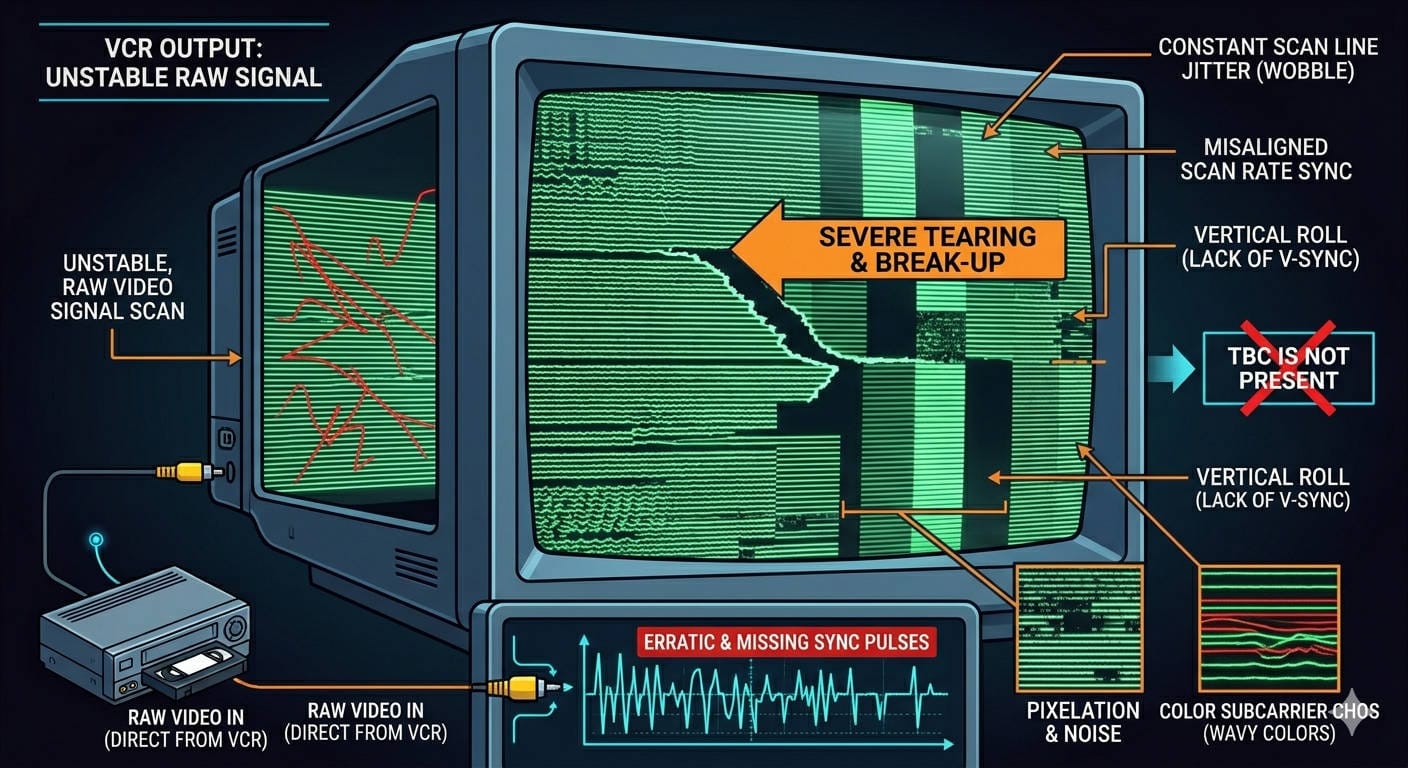
You finally captured the family tapes, you open the first file, and your heart sinks a little. There is a line near the top of the frame that leans and tears. Faces wobble and waver as people move, so a relative who looked perfectly well now looks gaunt and slightly seasick. On a shot filmed on the move — a camcorder up on someone’s shoulder, walking — diagonal lines drag through the picture. On the old telly in the lounge none of this was there — it looked fine. Now the same footage looks broken, and you are left wondering why your VHS capture looks worse than the tape ever did. The first thing worth saying plainly: you did not break anything, and the tape is almost certainly playing back exactly as it always did. Nearly all of what you are seeing is a timing problem, and most of it comes out with a single step.
The short answer
Two different things changed at once, and it is easy to blame the wrong one. The big one is what happened to the signal on its way into the computer: a VHS signal is never perfectly stable in time, and that instability — which the old television quietly corrected for you — gets recorded straight into the file unless something steps in to fix it. The smaller one is that you are now watching on a modern flat panel, which shows everything a CRT used to soften and hide. The timing problem is where the dramatic faults live, so let me take that first, because once you can name it the rest stops feeling like a mystery.
The timing problem — and the one step that fixes most of it
A VCR pulls the picture off a strip of tape dragged across spinning heads, and the timing of that mechanical process drifts constantly — by tiny amounts, line to line and frame to frame. The picture information itself is intact; what drifts is the timing — exactly when each line of the image arrives. That single fact explains all three of the faults above.
The leaning, tearing line near the top of the frame is the clearest signature. Time-base error is always worst at the very top of the picture and eases as you move down — so the top edge bends and “flags” while the rest looks steadier. It is a line-length error, not damage. The wavering faces are the same thing at a finer scale: each scanline is arriving a hair early or late, so vertical edges wobble and a face seems to breathe and stretch as it moves. And those diagonal lines on the walking shot are timing errors that were jostled into the recording at the time — a camcorder bouncing on a shoulder upsets the tape path as it records, and that disturbance is preserved in the signal. People assume a fault recorded that long ago is permanent. It usually is not.
The fix for all three is a time base corrector — a TBC. It re-clocks the unstable signal against a steady internal reference, straightening the lines back up before anything captures them. The CRT in the living room did much the same job in real time with its analogue sync circuit, which is exactly why you never saw any of this on the old set; a capture card has no equivalent, so without a TBC it faithfully records the wobble. All three of these faults are the horizontal class of timing error, and those are handled by a line TBC — built into many good S-VHS decks, or done in software as part of the vhs-decode workflow. There is a second class, vertical errors that cause dropped frames, which needs a frame synchroniser instead; the leaning top line, the wavering faces and the jostled diagonals all sit on the line-TBC side, which is why a single step clears them. I have unpicked which tool fixes which in the piece on the difference between a TBC and a frame sync device, and made the broader case in why a time base corrector matters.
I will add one candid caveat, because it is a real trade rather than a free win: a TBC can soften the image very slightly, and on a badly degraded tape, a TBC fed noisy sync edges can overcorrect and add its own instability. It is the right default for the vast majority of tapes — and the cure for all three faults above — but it is not magic on the worst cases.
The rest of the capture chain
Timing is the headline, but the path you capture through can add its own damage, and this is where method matters. A cheap USB adapter might save to MJPEG even at standard definition, which is lossy by design — it can add blocking and banding to a picture that had none of those things. Many also use a crude “drop-field” deinterlace that throws away half the picture, and their cheap converter paths cause audio-sync drift that gets worse the longer the recording runs. That is exactly the wrong failure for a two-hour family tape, and it is not recoverable without re-cutting the file by hand. Resolution is the quiet casualty in the same vein: some adapters force PAL’s 576 scan lines down to 480 as they capture, with no way to switch it off. VHS is frugal with detail to begin with, so handing away a chunk of the vertical resolution for nothing is a real loss, not a rounding error.
There are also quiet metadata mistakes that look alarmingly like tape damage but are nothing of the sort. Capture heights have to be standard — 576 or 288 for PAL, 480 or 240 for NTSC — or the software is forced to crop and resize, which gets ugly fast. A wrong horizontal resample softens the whole image. And a wrong field-order tag combs every bit of motion in the file, which looks like a wrecked tape but is pure metadata — a setting, not a fault. If you want to see what the current hardware landscape looks like and how to keep audio locked to picture, the capture hardware in 2026 guide covers it.
The screen changed too
Once the timing is sorted, a second, gentler reason remains: the old television was a softer, more forgiving instrument than the panel on your desk, and it was doing you favours you never noticed. Its electron beam spot was larger than a single scanline, so neighbouring lines overlapped and the picture smeared together pleasantly. Its own resolution was low, well under 400 lines once you account for dot pitch and phosphor, and that acted as a natural blur on a source that was already soft. VHS records only around 3 MHz of luminance detail and about a tenth of that in colour, so the tape was never sharp; the CRT blurred that soft picture into something that read as clean. A modern 1080p or 4K panel far out-resolves the source, so every soft edge, every patch of luma noise and every smear of colour now shows in high contrast. Dot crawl is a good example: those animated dots along sharp colour edges in composite video were quietly smeared away by many older sets, and a sharp panel renders them at full strength. (Overscan plays a small part here too: the panel shows a sliver of picture at the very edges that the CRT always cropped, including a band of head-switching noise at the bottom. It is real, but it is a footnote next to the timing story.)
Combing deserves a word of its own, because whether you see it genuinely depends. A CRT drew one field at a time and the phosphor faded fast, so your eye blended the two fields of each frame into smooth motion and there was nothing to comb. On a progressive screen the two fields can end up woven into a single still frame — and here is the part that depends on your footage. Home camcorder video is natively interlaced: the two fields are from slightly different moments, so any motion between them shows as comb teeth. Material shot on film and transferred to tape often has both fields from the same instant, and weaves together perfectly cleanly. That is one variable; the capture is the other. Some devices weave the fields, some build a frame from each, some discard one entirely. So combing is really an artefact of how the fields are handled, not something baked into every VHS tape. The differences between viewing and capturing are worth understanding on their own, and I have written about them in more depth in the capture differences piece.
I should be candid that this screen-side material is strong practitioner and engineering knowledge — the kind well understood by people who do this work daily — rather than peer-reviewed display science. But it holds up consistently in practice, and it explains the softness and colour noise people notice once the dramatic timing faults are gone.
What actually fixes it — the quality ladder
I tend to think of the fix path as a ladder, and the call I would make is to get the foundation right before spending on anything higher up. The foundation is a stable signal — the TBC step above — because everything else is built on it. From there the routes split in two. The first is the analogue capture approach: the conventional chain, where the deck demodulates the picture and you record whatever comes out of it. Here a decent capture path matters — S-Video keeps the brightness and colour signals separate, whereas composite merges them and gives you dot crawl, so S-Video is the call where the deck offers it. The next rung is the codec — capturing to a lossless format such as HuffYUV, Lagarith or UT Video rather than letting an adapter compress on the way in. A lossless capture does not modify the signal at all, which means any later restoration works on the true picture rather than on compression artefacts.
The second route, at the top of the ladder, is RF capture — the approach used by vhs-decode. Instead of letting the deck demodulate and filter the signal, you tap the raw radio-frequency signal straight off the heads and decode it in software afterwards, with the time-base correction done in that software pass. It sits at the top for one simple reason: conventional capture locks your quality in at the moment of capture, whereas RF gives you a true digital master you can re-decode later with better software as the tools improve. If you want to see how that works under the bonnet, I have written it up in how vhs-decode actually works.
What this cannot fix
Naming the things that cannot be rescued is, I think, the most useful part of any guide like this, because it stops you spending money chasing detail that is simply not there. Physical tape degradation is the hard limit. When the oxide layer sheds or the binder fails, the picture information that was on the flaked-off oxide is gone — there is nothing to recover. Sticky-shed syndrome and mould degrade or stop playback entirely, and while careful treatment can sometimes get a tape to play, it cannot put back what has left the surface. Generational loss is the same story in another form: every dub of a dub compounds the softness and noise, and there is no reconstructing an original you only hold a third-generation copy of.
There is one partial exception worth knowing about, and it has a proper name: dropout compensation. When a line goes missing, a dropout compensator (DOC) fills the gap by substituting another line in its place. The kind built into VCRs is crude — a one-line delay holds the previous line and swaps it in the moment a dropout is detected. Because the colour phase shifts from one line to the next, it copies the brightness only, so the patched spot flashes briefly to black and white rather than risk the wrong colour. The dropout detection and concealment in vhs-decode is not tied to that single-line delay. Its default method is inter-field concealment — it fills a gap from the matching field alongside rather than the line directly above, so it can cover longer dropouts and, because it works from already-decoded picture, keep the colour intact. Both handle brief, scattered dropouts well, and the software approach genuinely looks better. But neither rebuilds a wide swathe of shed oxide — there is nothing to borrow from once the signal is truly gone. As a rule, you cannot restore what is not there.
And then there is the format’s own ceiling. VHS at its best records only around 240 to 250 lines of horizontal detail, and the long-play and extended-play modes are worse. No process invents detail the format never recorded in the first place. This is the trap AI upscaling falls into: it synthesises plausible texture and edges, it can misread noise as detail, it can smooth faces into a plastic look, and it can add phantom edges that were never filmed. The result can be convincing, but it is not a closer record of what was actually in front of the camera. I have laid out exactly why in why AI upscaling doesn’t fix your old tapes.
Viewing it fairly
The last piece is judging the capture on fair terms, because a fair amount of “this looks terrible” comes down to viewing it wrongly. For a modern progressive screen, the footage needs to be deinterlaced correctly, with the field order right or the motion goes jerky and combed. Bob deinterlacing doubles the framerate and preserves the temporal detail at the cost of a little shimmer; QTGMC is motion-compensated and gets you near the full resolution — about as good as software deinterlacing gets. The approach I would take is to keep an interlaced master and derive a progressive copy from it for viewing, so the original field information is never thrown away.
A couple of small things are worth keeping in mind, too. There is little to be gained from judging a capture at heavy zoom — VHS does not survive close inspection, and nor would anything else shot on the format, so a sensible viewing size tells you far more than a magnified pixel-peep. And the CRT in your memory and the LCD file in front of you are really different instruments showing the same source, so the comparison was never quite a fair fight; a modern monitor running at 60 Hz cannot even show interlaced material the way a CRT did, which means what is on screen is already a derived view rather than the master itself.
So if that first capture looked broken, it almost certainly is not. Once the timing is corrected with a TBC and the footage is viewed on fair terms, most of what alarmed you simply falls away. What is left is the real limit of the format — soft, grainy, gloriously of its era — and that is a very different thing from a fault, and a far more peaceful one to live with.