Sooner or later, anyone who spends a bit of time reading about tape preservation runs into the term vhs-decode, which is (technically speaking) FM RF Archival. The question remaining is the practical one, what is this thing actually doing and is it for me?
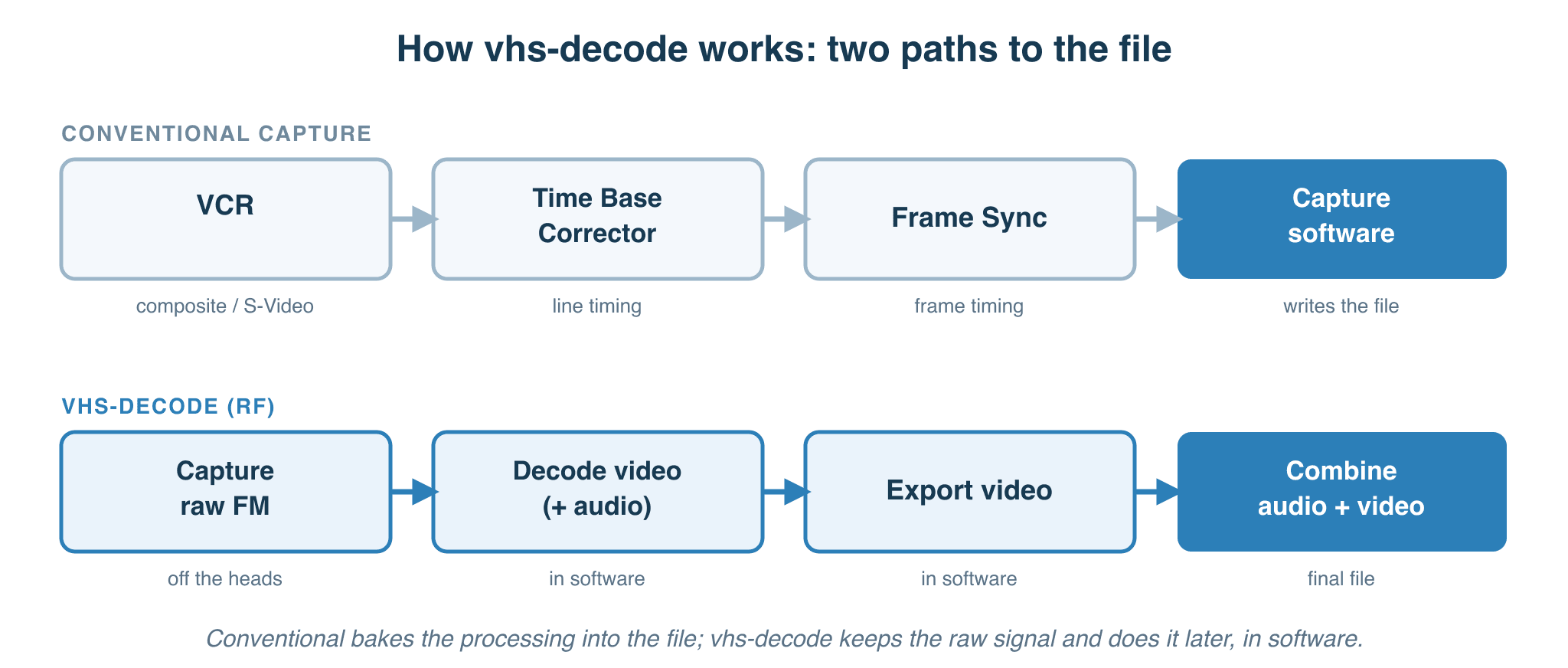
This article is an attempt to answer that without writing a how-to. By the end you should know what vhs-decode is (RF capture and decoding), why it exists, what it genuinely does better than the conventional path, what it costs, and — the question most articles dodge — whether it’s worth the trouble for the tapes sitting in your cupboard.
vhs-decode (FM RF Archival & Decode) in one paragraph
Conventional VHS capture plugs the deck’s yellow or S-Video output into a USB, PCIe or Thunderbolt capture device, which records the picture the VCR has already decoded. vhs-decode (FM RF Archival) does something different. It taps into the VCR earlier — at a test point or directly on the legs of the head amplifier chip, before any of the deck’s own decoding circuitry has touched the signal and records the raw electrical waveform coming off the spinning heads. That big raw recording is technically stored as an audio file, a FLAC and its waveform is actually viewable in ordinary audio-editing software even though what it’s carrying is video RF rather than sound. A separate software step turns this into a decoded video file. The advantages are real, better picture quality than the deck’s internal electronics can produce, a file that can be re-decoded as the software improves and an archive copy that captures what was read from tape rather than what your particular VCR chose to make of it. The drawbacks are also real, a bit more storage, more time and a steeper learning curve than plugging in a USB stick. It isn’t for every tape and it isn’t for every person.
Why anyone built this in the first place
A conventional VHS capture is a journey through a series of decisions, made on your behalf, that you never see and can never revisit. The VCR’s demodulator and chroma processing decide how to separate colour from brightness. Its time-base corrector (if it has one) decides how much jitter to absorb. Its dropout compensator decides what to paste over the moments when contamination or oxide loss causes the head to lose contact with the tape, dropping a few lines of signal. Every one of those decisions was designed for 1970s to 1980s silicon costs, and every one of them is baked permanently into the file your capture card writes to disk.
The honest framing of what conventional capture gives you is this: a recording of what your VCR thinks the tape says, made with electronics designed to a price point thirty years ago. If the deck’s chroma circuit slightly overshoots on saturated reds, your file overshoots on saturated reds. If the dropout compensator pastes the previous line of video over a glitch, your file has the pasted line — and there’s no way to tell later which lines are real and which are fill-in. The capture path doesn’t preserve the tape; it preserves the deck’s interpretation of the tape.
The vhs-decode project was built on a different premise. The reasoning, stated in slightly different ways by different people across the community for the better part of a decade, goes something like this. The signal coming off the head, before any of the deck’s electronics get to it, contains more information than what comes out the other end. Every analog stage between the head and the composite output adds loss. If you can capture that earlier signal — the raw RF — and decode it in software, you have a few things you don’t have any other way. You have a file that doesn’t carry the deck’s mistakes. You have a file the next version of the software can re-decode and improve. And you have something that functions as a digital negative of the tape: the bits and pieces of waveform the head was able to read, captured before any decisions were made about what they meant.
That last bit changed my mind about all this. The video file isn’t the archive in this model. The raw RF capture is the archive. The video is a print made from the negative — a print that can be made again, better, when better tools exist.
What’s actually happening in the signal chain
A conventional capture stick is a small box that samples a composite or S-Video signal at around 14.3 megasamples per second for NTSC or 17.7 for PAL — the 4fsc rate defined in SMPTE 244M for digitising a composite signal. The signal arriving at the capture stick has already been through every stage of the VCR’s electronics. The capture stick records what the deck handed it.
vhs-decode samples a different signal at a different point. Inside most VCRs there’s a small PCB called the head amplifier, sitting close to the rotating drum, which is the first stage of electronics the heads’ output passes through. Most consumer decks have one or two test points on this board (small solder pads or bars to clip to that the factory used for calibration and servicing) and which expose the raw FM-modulated signal coming off the heads. A vhs-decode setup taps that test point through and limits the signal draw (impedance matching) then amplifies the signal via a custom amplifier and routes it out to an analog-to-digital converter card, which samples considerably faster than a conventional capture stick, on a signal that contains everything the heads were able to read off the tape.
What the video heads actually put out, in case you’ve ever wondered, is a single composite waveform with two things layered on top of each other. The brightness information is FM-modulated around a carrier in the low megahertz — roughly 3.4 to 4.4 MHz for NTSC VHS, 3.8 to 4.8 for PAL VHS, with S-VHS shifting the whole band higher again. The colour information is sitting underneath at around 629 kilohertz on NTSC or 627 kilohertz on PAL, downconverted from its broadcast frequency at record time — this is the “colour-under” scheme that VHS, Betamax, U-matic and 8mm all share. Brightness and chroma come off the same heads, through the same amplifier, to the same solder pad, with tape noise threaded throughout. HiFi audio — if the tape has it — is a separate story. It’s recorded by a different pair of heads at a deeper layer in the tape, as a pair of FM carriers around 1.4 megahertz, and read back through a different amplifier in the deck. Capturing it means a second tap point on the audio side. Most people who start with vhs-decode capture video first and add HiFi later if they want it.
The decoder software then does in code what the VCR’s hardware would have done. It demodulates the brightness signal. It finds the sync pulses that mark the start of each line and field. It uses those sync pulses to do time-base correction — aligning every line to a known length, taking out the mechanical wobble the tape transport introduces. It separates the colour signal out of the same captured RF, lifts it back up to its proper subcarrier frequency, and applies time-base correction to it as well — something almost no consumer VCR ever did. And it handles dropouts, with proper linear interpolation rather than the cruder paste-the-previous-line trick consumer decks use.
The intermediate result is a .tbc file — a time-base-corrected pair of streams, one for brightness and one for colour. A second program turns the .tbc into actual video. The split exists for a practical reason: if a smarter colour decoder ships next year, you can re-run that second step against your existing .tbc files in a fraction of the time it would take to demodulate the RF again from scratch.
The naming is slightly misleading
Despite the name, vhs-decode handles more than VHS. The same software, with different parameter profiles, handles Betamax, U-matic, S-VHS, Video8, Hi8, the Philips VCR format, EIAJ, and even 2-inch Quad and Type-C, with more formats added most years. A sibling project, hifi-decode, handles the FM stereo audio tracks. Another sibling, ld-decode, handles LaserDisc and is the project that started this whole approach.
There’s also cvbs-decode — the same time-base correction and colour-decoding software applied directly to an already-composite signal instead of raw RF, skipping the demodulation step entirely. It’s useful for capturing straight off a camera, or for preserving formats and decks where a genuine RF tap isn’t practical, such as professional D2/D3 digital composite tape. It’s still the least mature of the group. The shared architecture across all of them is the same: capture the RF, decode in software, keep the RF as the archive.
What it genuinely does better
The advantages over conventional capture come down to four things.
The first is colour. The colour-handling improvements that have landed in the decoder over the last couple of years — proper time-base correction applied to the chroma signal, accurate detection of NTSC’s chroma phase rotation — produce colour better than the analog circuits in any consumer VCR can manage. And the same RF capture, run through a 2026 decoder, looks better than it did when run through a 2023 decoder. Nothing about the tape changed; the software got smarter.
The second is dropouts. Linear interpolation — blending the lines above and below a dropout — produces a better picture than sample-and-hold — pasting the previous line over the gap. The maths of that has been understood for decades; consumer decks all use sample-and-hold because doing it properly in real time was prohibitively expensive in 1985. Software has no such constraint. But the catch is that for the software to do better than the deck, it needs the raw signal before the deck’s dropout compensator has already substituted its sample-and-hold fill-in. That’s only possible with an RF tap.
The third is honesty about the tape’s condition. With the RF in hand, you can tell whether an artefact is on the tape, in the deck, or in the decoder, because you can re-decode the same RF with different settings and see what changes. Without the RF, you can’t make that distinction — you have one rendering and no way to interrogate it.
The fourth is future-proofing. The .tbc and the video file are renderings, and they can be remade. The RF FLAC is what was on the tape. If you keep the RF, you keep the option of doing better later. If you only keep the video file, that option is gone.
What it costs
Storage is the most quantifiable, and the numbers are not small, plus they vary a lot depending on which device you’re capturing with. A CX-card setup, typically 8-bit at 16 to 20 megasamples per second is comparatively modest using approximately 20 to 25 GB per hour of tape, FLAC-compressed. A Domesday Duplicator (DdD) samples at a higher 40 megasamples per second and unlike most CX-card setups at 10-bit rather than 8-bit. These two factors both push the raw data rate up for the DdD and the files follow. My own captures come in around 115 to 120 GB per hour, specifically a 1:52:51 NTSC tape compressing to 226.41 GB and a 2:31:02 PAL tape to 290.43 GB, which lines up with what other DdD owners report in the forums. The decoded video in the lossless FFV1 format most people keep, adds another 45 to 60 GB per hour on top. While the decoder is running you need at least the size of the capture again in working disk, so the practical requirement during processing is more than double the capture size. A modest archive of a few dozen tapes lands in the tens of terabytes once the RF, the working files and the decoded video are all on disk. Plan for storage on that scale plus backups.
The hardware is a deck capable of being modified, plus the capture electronics. A common starting build is a Conexant CX2388x-based PCI capture card (25 to 35 US dollars on AliExpress), a Clockgen Mod board that lets it sample at higher rates and keeps audio in sync (a fully assembled kit from the community’s Ko-fi store runs about 60 GBP, roughly 75 to 80 US dollars), and an ADA4857 amplifier board that sits between the deck’s tap point and the capture card (around 40 US dollars). All in, the capture electronics come to roughly 140 to 155 US dollars, plus a PC to run it on and the deck itself.
The longer-running alternative is the DomesdayDuplicator, the original purpose built RF capture device born for LaserDisc and originally used on the vhs-decode side as well, though it’s since been outgrown, in large part because of audio challenges, cost and arguably disk space. It samples at 40 megasamples per second in 10 bits and it captures a single channel of RF only, which means audio is a separate problem, a second ADC, a sync wire that carries the DdD’s master clock across to that ADC, and software that knows how to interleave the resulting streams correctly. The ddd-capture-toolkit project handles that pairing as part of a wider batch workflow that runs the full capture-to-archive pipeline.
The MISRC project is a more recent purpose-built single board that consolidates the need of 2x RF + 2x Audio channel capture functions more cleanly, and uses cheap HDMI capture dongles with the MS2130 or MS2131 chipsets, sending RAW data samples over the hackable and uncompressed HDMI feed, however the CX Cards + Clockgen Mod build is still the most common in 2026, with the DdD being fairly popular for Laserdisc only users (or those who made the mistake like me), but at a cost point matching or over the MISRC v1.5a at the time of writing due to using off-shelf dev boards.
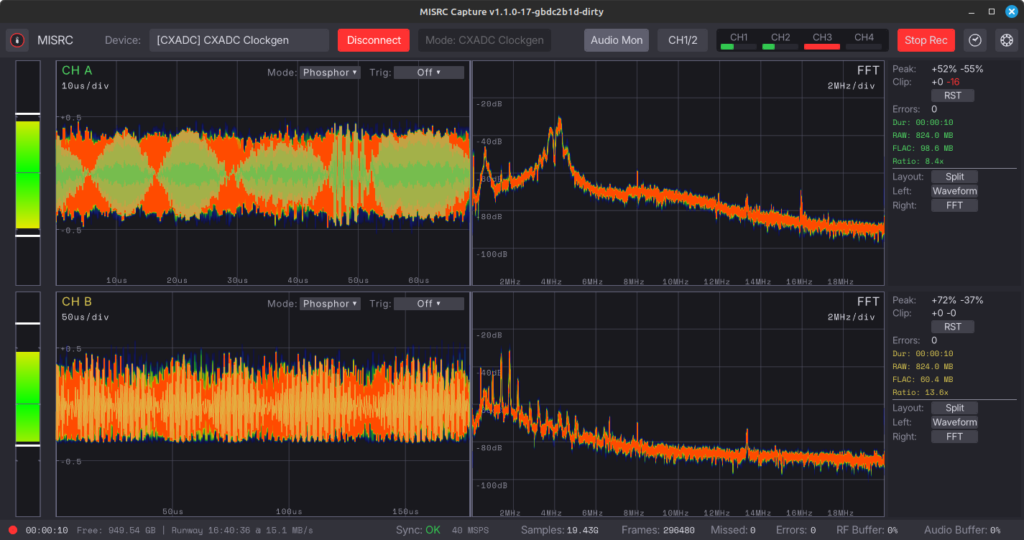
MISRC GUI v1.1.1 (Supporting the MISRC V1.5/V2.5 – Clockgen Mod Workflow – DdD and more)
The justification for the DdD’s higher cost and larger files is the principle that the initial capture should be as accurate and information dense as the hardware can practically manage because data is much easier to throw away later than to recover. The DdD’s 40MSPS at 10 bits per sample is one expression of that principle, a modded CX Card running at 40MSPS and 8 bits is another. Whether the bit-depth difference translates to a visible quality difference between the two paths is the question I’d want to settle with side-by-side captures rather than first principles arguments. That principle, capturing as close to the original signal as possible, is the same one professional video-preservation guidance is built on, such as the IASA guidelines for the preservation of video recordings.
The deck has to be one that can be modified. Combo VCR/DVD units with modern decoder chips tend to be unsuitable. The community maintains a list of decks with documented tap points, and starting with one of those is much easier than trying to figure out a deck from scratch.
The time cost has several parts. Capture is real time — a three-hour tape takes three hours to capture, the same as conventional. Decoding is not real time and not multi-threaded; the decode of a three-hour tape typically takes longer than the tape itself, sometimes substantially longer depending on format, decoder options, and the CPU. After decode there are still the export, compression, and audio multiplexing steps before you have a finished file. The decoder is single-threaded by design — correctness comes first, performance later. The practical pattern is to queue captures up and run decode plus the downstream steps as overnight or weekend jobs.
The toolchain is for decoding to export is 100% cross platform x86/Arm64 Windows/Linux/MacOS, The capture driver for CX Cards is Linux native, Windows support is experimental, Mac support is limited to patchy on the DdD but solid on the MISRC/HSDAOH workflow, but most of the troubleshooting conversations on the community Discord assume a Linux capture machine. It isn’t a deal-breaker, a cheap second-hand office PC running Linux just for capture works fine, but it’s worth knowing before you start.
The skill floor is real and worth naming honestly. You need basic to moderate electronics knowledge — enough to tap a working VCR without breaking it, and enough to build (or, increasingly, buy pre-built) the ADA4857 amplifier board that sits between the deck and the ADC. Even with a pre-built amplifier, unless your deck happens to be one of the few thoroughly characterised in the community wiki, you’ll likely need to solder very small surface-mount resistors onto the amplifier to match it to your particular deck’s signal level — and doing that properly wants an oscilloscope on the bench, or a willingness to work by elimination. Beyond the hardware there’s a multi-step pipeline to chain together — capture, decode, export, compression, audio multiplex — each with its own command-line tool and configuration. Plan on months to get a working setup running, and on continuing to tweak it after that. Managed tooling is starting to bridge some of this — the ddd-capture-toolkit project, for instance, batches the full capture-to-archive pipeline into a single coordinated workflow aimed at lowering the floor — but the user community still skews substantially toward people who enjoy building things.
Who actually benefits
For a single box of family holiday tapes, in reasonable condition, that someone just wants to be able to watch on a laptop and email to relatives — conventional capture is fine. A good deck, a decent capture card, a careful capture session: that combination produces watchable, archivable video that everyone in the family will be happy with. The vhs-decode path’s cost in time, storage, skill, and hardware isn’t proportionate to what you’d get back from twenty tapes of someone’s birthday party. The dropout-compensation improvement, in particular, only matters on tapes that have meaningful dropouts to begin with — on a tape in reasonable condition, the deck’s own compensator is rarely the bottleneck.
The case is much stronger when the tapes themselves are irreplaceable. The only surviving copy of a wedding. A grandparent’s home movies. A community-history archive nobody else has. The recordings of a public-access TV show that aired once and was never released. The principle in those cases is simple: the tape is going to be played a very small number of times before something — the deck, the heads, the binder, the tape itself — fails for good. Capturing the raw RF on what may be one of the tape’s last good plays means the archive doesn’t depend on the decoder that happened to be current on the day you captured it. The same RF, decoded with whatever the software looks like in ten years’ time, gives a better picture than is possible today. That’s an option worth having.
The case is also stronger when the tapes are in difficult condition — sticky shed, weak signal, dropouts on every field. Conventional capture lets the deck’s old electronics make all the judgement calls about how to compensate, with no record of what the head actually saw. RF capture preserves what the head saw, and lets the decoder make better calls than the deck can.
And the case is stronger when the archivist genuinely wants the best possible master, knowing they may want to revisit it. A family archive of fifty tapes intended as a great-grandchildren’s archive is a different proposition from fifty tapes intended for next month’s family screening night. Both are valid; they don’t require the same amount of work.
If I had to put a single sentence on it: vhs-decode is a serious tool for tapes that deserve serious treatment, and most family archivists won’t have many tapes in that category. The right answer for most readers is to make peace with conventional capture, do it carefully, and treat the resulting file as good enough because it is good enough for what most people need to do.
The misconceptions that keep coming up
A handful of incorrect ideas about vhs-decode keep recurring.
It’s lossless. True in one specific sense, misleading in the general sense. The RF capture itself is mathematically lossless, FLAC doesn’t throw any samples away and the RF is the rawest signal available short of probing the head amplifier with an oscilloscope. But VHS as a format discards information at record time. The colour subsystem is heavily bandlimited, the luminance bandwidth is hard-capped by the FM modulation scheme. No capture path, however good, recovers information the format didn’t record in the first place. The .tbc and video file are also not lossless in the codec sense — they’re one version of the decoder’s interpretation of the RF, which is precisely why the RF stays as the long-term archive.
It needs a thousand dollar deck. No. The community’s recommended entry-level decks are common, mid-priced consumer units from the late 1990s that turn up regularly on the second-hand market. The flagship deck most people aspire to is the Panasonic AG-1980, but the reason it’s recommended isn’t that it produces dramatically better pictures than other decks, it’s that the tap-point modifications and quirks are extensively documented, the chassis is accessible, and a couple of decades of community experience has been built around it. A simpler deck with documented taps is a perfectly reasonable place to start.
It’s only for VHS. No, despite the name. The same decoder handles VHS, S-VHS, Betamax, U-matic, the Video8 and Hi8 family and the VHD disc format, each with their own format setting. The sibling projects cover LaserDisc, raw composite video, and HiFi audio. The name predates the project’s scope.
The decoded video is the archive. No, this is probably the most important point in the whole article and the one the community is most insistent about. The video file is a rendering. The RF FLAC is the archive. If storage forces you to choose, choose the RF. The video can be remade, the RF cannot.
A consumer “TBC” box will clean up the captures. Almost never. The great majority of devices sold as TBCs to consumers are frame synchronisers — they stabilise frame timing but do nothing about the within-line jitter that’s the actual source of most VHS capture problems. vhs-decode is its own time-base corrector, in software, and is much better at the job than any consumer TBC box. The site has a separate article on the distinction and another on why a real TBC matters for the conventional path.
The BNC connector modification is essential. No. People still recommend swapping the RCA jacks on the CX card for BNC connectors as a quality upgrade. Measurements done with actual test equipment show no detectable difference. The mod is fine if you happen to want BNC connectors, it isn’t a quality improvement.
Remove the low-pass filter from the CX card. This is one that genuinely matters because the wrong advice has been circulating for years. Removing the LPF helps for LaserDisc RF capture, where the relevant signal sits above the filter’s corner frequency. For VHS RF, the LPF should stay, removing it makes captures worse and forces you to filter externally. The bad advice on this point predates the more careful community testing and is still findable on old forum posts.
What you cannot get from it
vhs-decode does not recover information that wasn’t on the tape. If the colour was bandlimited at record time, the colour is still bandlimited after decoding. If a passage is permanently dropped because the oxide flaked off, no decoder brings it back. The advantages are about capturing what is there more faithfully and more reproducibly, they are not about magicking back what isn’t.
It does not make a damaged deck produce good captures. A tired head amplifier, dirty heads or a mistracking transport, all of these manifest in the RF capture just as they would in a conventional capture. The cleaner signal path doesn’t compensate for a deck that needs servicing.
It does not save you from having to think about the tape. Cleaning the heads, inspecting the spool, doing a fast-forward-rewind pass on a tape that’s been sitting in a box for thirty years, deciding whether a sticky tape needs baking before a capture pass, none of this changes. The capture chain is one part of a longer process.
And it is not finished. Active development means that the right command-line flags this month may not be the right flags next month. New format support lands, default behaviour changes, edge cases get found and fixed. This is part of why the RF capture is so valuable, it’s the only part of the workflow that doesn’t go stale. The decoders evolve, the RF doesn’t.
Where to go from here
If you’re trying to work out whether your specific situation justifies the effort, the questions to ask yourself are practical ones. How many tapes do you have, and how irreplaceable are they? Do you already have a deck you’d be willing to open, or would the hardware all be new? Are you comfortable with a command-line workflow, or is plug-and-play closer to your line? Are the tapes in good condition, or are dropouts and tracking problems already visible on conventional captures? The answers tend to make the choice fairly clear.
For most readers, the answer is going to be, do the conventional capture carefully, keep the resulting files safe and backed up, and revisit the question only if you have a small number of tapes you genuinely cannot replace. That isn’t a defeatist answer. It’s the proportionate answer for the work in front of most archivists, and there’s no shame in landing on it.
For the small number of readers for whom this is genuinely the right tool, you’ll already have a sense of which tapes the answer applies to. Start small. Pick one tape that matters. Get one capture chain working. Decode it. Look at the result against a conventional capture of the same tape. Then decide whether to scale up. The community will be there if and when you need it.
What’s next
The articles on why a Time Base Corrector matters and the difference between a TBC and a frame sync cover the conventional-capture side of the same territory, and are worth reading either way — the principles of time-base correction are the same whether you’re doing it in hardware or in software.