This is the companion to Part I, where designing a family backup came down to a few live copies, carried forward onto fresh hardware over the years, with at least one of them kept somewhere other than the house. That last copy, your off-site backup, is what this article is about: the ways to hold it, what each costs, and which of them actually suits a family. Part I made the architectural case and pointed here for the detail, so I won’t go back over the three-copies reasoning. If you haven’t read it, start there and come back.
I’ll say at the outset where this lands, because it isn’t where the marketing points. There are really three ways to keep a copy out of the building: hand one to family, rent space in the cloud, or run a second machine somewhere else yourself. For most people with a serious archive the cloud turns out not to be the answer, and the rest of this article is the working-out behind that. The decision in the end is yours, and what it comes down to first is a number most people have never worked out: how much you are actually trying to protect.
How big is your archive, really?
Before any of the options make sense you need a rough idea of how much you’re protecting, because that one number decides not just which option fits but whether this is a decision worth agonising over at all. Archives vary more than people expect, by a factor of thousands rather than twos.
It helps to know what makes an archive big, because it’s almost always one thing: video. A lifetime of scanned photographs and documents, even a great many, tends to land in the tens of gigabytes. It’s moving footage that consumes the most space. The highest-quality way of capturing a video tape records the raw signal straight off the tape, before any machine has tidied it up, and it is hungry: something like 100 to 130 gigabytes for every hour.
A simpler capture depends entirely on the gear: a cheap USB adapter throws much of the picture away and lands at only a few gigabytes a tape, while a proper archival capture that keeps everything the tape still holds is nearer 50 gigabytes. Audio cassettes saved at full quality are smaller again. So the real question under “how big is my archive” is “how much video have I got, and how well do I want to keep it”.
That gives you roughly four sizes of problem, and they are genuinely different problems:
| Your archive | What that usually means | Roughly what cloud costs | The obvious answer |
|---|---|---|---|
| Up to ~20 GB | A modest collection of scanned photos and documents | Probably free | Free space you already have, or MEGA’s free tier |
| ~20 GB to ~2 TB | A decent photo library, maybe a little video | ~US$20 to US$120 a year | A fixed consumer plan such as Internxt, pCloud or Google One |
| ~2 to ~5 TB | A fair amount of captured video | ~US$70 to US$180 a year | Storage you rent by the terabyte, like Hetzner or MEGA S4 |
| ~5 terabytes and up | A serious tape archive at high quality | Climbs past several hundred a year, and never stops | A box of your own, nearer US$150–200 a year once power is counted |
Three numbers in that table are where everything changes. The first is around fifteen or twenty gigabytes, where the free space you already have runs out, though “free” deserves an asterisk: a Google or Apple allowance fills quietly with phone photos and mail, so it’s worth thinking in terms of the extra room the archive needs rather than the headline figure. If you’d rather keep the archive clear of all that, MEGA gives around 20 gigabytes on an account of its own, which is enough for a tidy photo collection and has nothing to do with your phone.
The second is around two terabytes, the size people often call “small” when it is nothing of the sort: a substantial archive, still affordable, but a real bill that arrives every year for as long as you keep it. The third, and the one this whole article turns on, is somewhere around five to ten terabytes, depending on what you count. That is the point where owning the hardware starts to cost less than renting it, and by the tens of terabytes it isn’t close. It isn’t a perfectly clean line, for reasons I come to under the costs below, but the direction of travel isn’t in doubt.
So keep your own rough figure in mind as you read. Everything below changes shape depending on whether you’re protecting twenty gigabytes, two terabytes or fifty.
Where the cloud stops making sense
It helps to be clear about the job this off-site backup actually does, because the cloud especially is sold as one simple thing and stops being simple the moment a family archive is involved. Its role is narrow. It’s the copy that stays in sync with the working archive on your main drive at home, so that when a new batch of scans or captures lands, the off-site copy catches up on its own rather than waiting for you to remember it. That’s a different job from the spare drive in the cupboard, which isn’t trying to keep in sync and earns its keep precisely because it spends its life unplugged.
The two sit at different points in the chain and neither replaces the other.
Take cost first, because it’s the thing that catches people out. Keeping an entire serious archive copied to the cloud costs somewhere between a few hundred and a few thousand dollars a year, every year, for as long as the archive exists, and very few families will keep paying that. The ones who start usually stop quietly a few years in, which is the worst outcome of all because nothing announces it. So the cloud really only makes sense in two situations.
The first is that your archive is small enough that the yearly cost stays comfortable, which as the table above shows covers everything from a free-tier photo collection up to a couple of terabytes at fifty to a hundred and twenty dollars a year. The second is that you’re running this as a funded operation, a professional outfit with a budget that carries the bill. If you’re neither, the cloud can still hold a carefully chosen slice of your archive, but the realistic home for the whole thing is one of the other two paths.
The three paths, simplest first
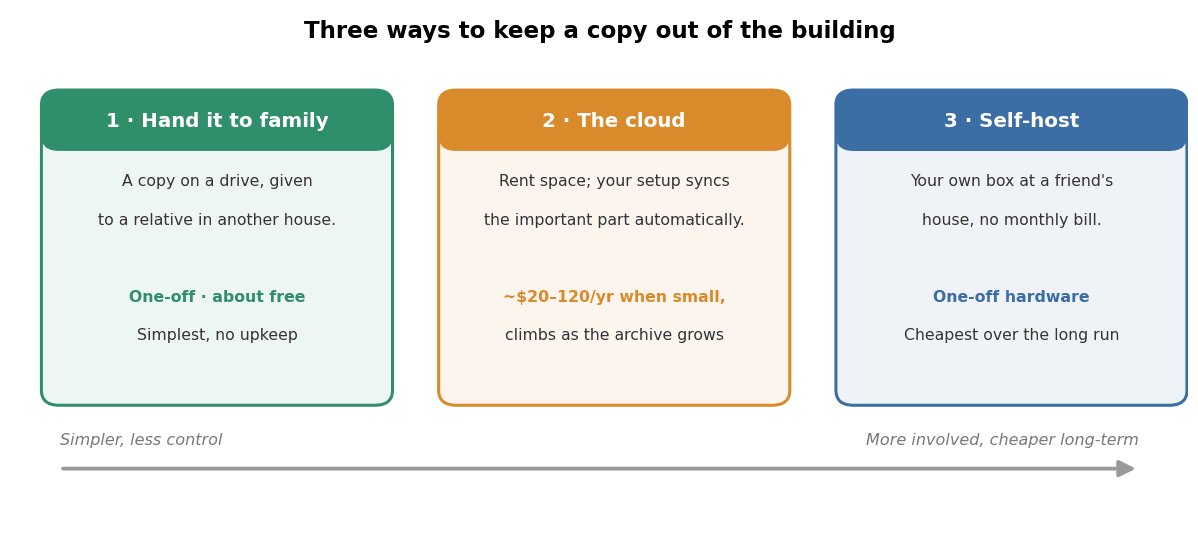
Here are the three ways to get a copy out of the building. Each gets its own treatment below, or its own article where there’s enough to say.
The simplest is to hand a copy to family. Copy the part you couldn’t bear to lose onto a drive, give it to a relative in another house, and you’re done. It isn’t clever and it doesn’t keep itself up to date, but a copy in another building beats the elaborate system you never finished. For a lot of people this is a perfectly good end point, and I’ll come back to why it’s nothing to be ashamed of.
The middle path is the cloud: you rent space from a company, and your setup at home copies the important part of your archive up to it automatically. It asks the least of you day to day, you pay every year for as long as you keep it, and the trick is choosing a provider that won’t surprise you with a bill on the day you need your data back. Which provider to pick, and how the different kinds of cloud storage differ, is its own piece: Choosing a cloud provider for your family archive.
The most involved path, and the cheapest over time, is to run a second machine yourself, usually at a friend’s or relative’s house, and have your home setup copy to it over the internet. After the upfront cost of the hardware there’s nothing more to pay. It asks the most of you to set up and look after, and it’s the path I take myself. If you run a home network drive, or you’re tempted to, that’s the subject of Self-hosting your off-site backup: a NAS at a friend’s house.
What an off-site backup actually costs
The reason I keep coming back to cost is that it decides between these three paths more than anything else, so it’s worth seeing the actual numbers. Here’s what the same choice costs at two sizes: a two-terabyte slice of your most precious material, against a whole serious archive.
| Provider | 2 TB slice / year | Whole 13 TB / year |
|---|---|---|
| MEGA S4 | ~US$72 | ~US$468 |
| IDrive e2 | ~US$99 | ~US$644 |
| Backblaze B2 | ~US$144 | ~US$936 |
| Wasabi | ~US$168 | ~US$1,090 |
| Cloudflare R2 | ~US$360 | ~US$2,340 |
There’s the answer to whether two terabytes is “cheap”. A carefully chosen slice of that size, copied off-site, runs somewhere between about US$70 and US$170 a year depending on the provider, a real recurring bill but one most households can manage. The whole thirteen-terabyte archive runs from several hundred to a couple of thousand a year, every year, which most households can’t. That gap is the whole argument, and it’s why I’ll stop hedging and tell you what I actually do.
My own archive lives on four large drives arranged so that if one of them fails the data survives, which gives me around 48 terabytes of room to grow into. The drives presently cost somewhere around US$1,800 all up, they carry a five-year warranty, and in practice they tend to last longer. Copying even the 13 terabytes I hold today to the cheapest sensible cloud service would run to about US$900 a year, and as the drives fill that climbs past US$3,000. A single year of the cloud bill buys roughly half the hardware, and two years buys all of it.
Over the life of the drives the cloud costs several times what the disks do, and it keeps accruing against your favour.
I should be straight that this isn’t a perfectly clean comparison. It weighs hardware against rent, the drives and the box spread over the five-odd years they last, and it treats three things as free: my own time to set it up and tend it, the electricity to run a box around the clock, and a friend willing to house it. Count those in and the crossover drifts higher, nearer ten terabytes than five; leave them out, as a hobbyist who enjoys the tinkering fairly might, and it sits lower. Two real-world wrinkles sit on top of that.
The first is in your favour: drives never come in the exact size you need, so four disks of three or four terabytes each give you room to grow at no extra cost, where the cloud meter only ever climbs. The second is not: doing it properly usually means two boxes rather than one, your working drive at home and a second at the friend’s holding the off-site copy, which is nearly free if you already run a NAS (or they do) and a real outlay if you don’t.
Which way it all falls comes down to your skill, or who you can call on, and the kit you already have, which is what the self-hosting article works through.
One more thing bends this, and it bends toward owning: the horizon. Five years is the warranty, not the lifespan, and a family archive is really a twenty-year undertaking rather than a five-year one, since the capturing alone can take years. Over that long the hardware is mostly bought once while the rent never stops, so the longer you mean to keep the archive, the more decisively a box of your own wins. What a long horizon can’t settle is the upkeep, and who tends the archive when you no longer can; that is the succession question Part II takes up.
To put numbers on it, here is what a thirteen-terabyte archive costs all in over each horizon: a box of your own, counting the power to run it and a replacement drive or two along the way, set against renting the same space at a cheap rate and at a typical one.
| Over… | A box of your own | Cheap cloud (~US$470/yr) | Typical cloud (~US$940/yr) |
|---|---|---|---|
| 5 years | ~US$2,100 | ~US$2,300 | ~US$4,700 |
| 10 years | ~US$3,100 | ~US$4,700 | ~US$9,400 |
| 20 years | ~US$4,800 | ~US$9,400 | ~US$18,800 |
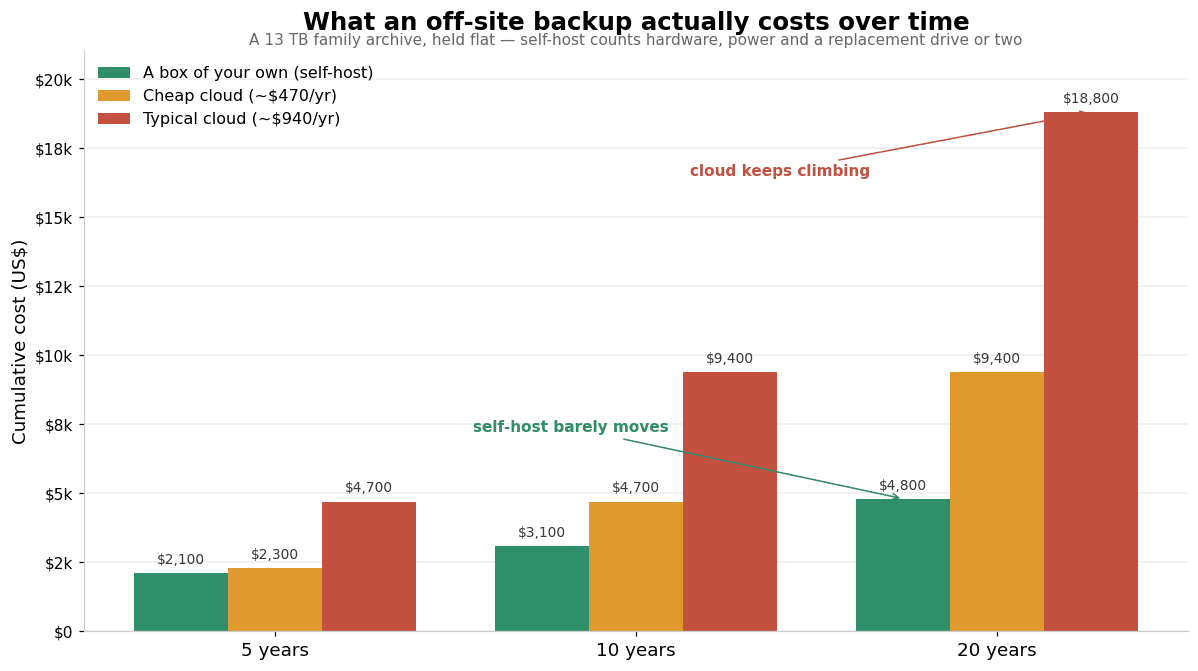
At five years it is roughly a wash against the cheapest cloud and already half the price of a typical one. By twenty it is no contest, and that is with the archive held still; let it grow, as it will, and the cloud columns keep climbing while the hardware one barely moves.
Even allowing for all of that, the maths is why I’ve given up on the cloud for backup. I don’t think it’s usable for a serious family archive unless you either don’t have much data, or you’re a professional outfit with a budget that carries it. For me it’s neither, so my off-site copy is a couple of disks living in a friend’s house, which my setup at home copies to over the internet (and theirs to mine). None of which makes doing it yourself cheap.
US$1,800 of drives is real money, and it’s the reason the floor for most people isn’t a network drive at all, but the simplest thing that gets a second copy out of the building: a drive handed to family.
Pick the path that fits you
There’s no single right answer here, because the right one depends as much on your patience and skill as on your data. The capture guides on this site tend to split decisions three ways, and the same split works for backup.
If you’re the Impatient, you want a second copy to exist and you don’t want a project. The move is the simplest thing that works: copy the irreplaceable part of your archive onto a drive, hand it to a family member in another house, and you’re done. It isn’t synced and it isn’t clever, but a copy in another building beats the elaborate system you never finished.
If you’re the Libran, after the balance of effort and result, a consumer network drive is the sweet spot. A QNAP or TrueNAS box, with a friend who has one too and copies between you, gives you most of what the elaborate setup does without the hard parts. And if even that’s a step too far, a modest cloud slice asks almost nothing of you. Either way it’s the kind of job you can pay a local technician to set up once and then mostly leave alone, and there’s no shame in buying the expertise rather than learning it.
If you’re the Perfectionist, it’s a self-hosted setup at home copying to a friend’s box, encrypted, with your restores tested on a schedule. It’s the most resilient thing you can build at home, and it’s what I run myself. I won’t pretend it’s easy; it took time to learn and it takes a little ongoing attention to keep healthy. The self-hosting article is the one to read.
It’s worth saying plainly, because the archiving world rarely does: handing a copy to family and walking away is a legitimate end state, not a failure. You can’t be expected to be the sole keeper of everything forever. A backup in your sister’s cupboard that you’ve stopped worrying about has saved more family memories than the perfect setup that was always “nearly ready”. If that’s where you land, you’ve still done the thing that matters.
Keeping it out of the wrong hands
Wherever your off-site backup lives, you’re handing it to someone: a company’s servers, or a friend’s spare room. For most people that’s fine, and they needn’t give it a second thought. For some it is emphatically not, for reasons that run from a plain wish for privacy to a job that forbids them from appearing online at all. I won’t go into those reasons here, but if you have them you’ll already know it. The tool that answers them is encryption, scrambling the copy so that only authorised people can open it, and the one thing worth saying now is that not everything sold as encrypted keeps anyone else out.
The difference is the whole point, and it’s a big enough subject to need its own article. That article is Keeping your family archive out of the wrong hands. For now, if keeping your archive to yourself matters, know that it’s both possible and worth doing properly.
None of it counts until you’ve tested a restore
One last thing, and it’s the one almost everyone skips. A backup you’ve never restored from isn’t a backup; it’s a hope. The first time you try to pull your data back should not be the day you actually need it. Whatever you build, a cloud copy, a box at a friend’s, a drive handed to family, take an hour, pretend the original is gone, and bring some of it back. Open the files. Check the photos are photos and the video plays. Then do it again in a year.
A surprising share of backup disasters weren’t a failure to copy at all; they were a copy that turned out, on the one day it mattered, to be unreadable. Encrypted copies are especially worth testing, because a copy you can’t unlock is no copy at all.
What I’d recommend
Stripped right down, then. If your archive is genuinely small, a couple of terabytes or less captured simply, the cloud is a fine and easy answer, and the cloud guide makes the picks. If your archive is large and serious, the numbers point away from the cloud and toward a second machine in someone else’s house: a consumer box with a friend if you want the balanced path, a full self-hosted setup if you’re the perfectionist, and a local technician’s help if neither of those is you. And if all of that is more than you can take on, copy what matters most onto a drive and give it to family. That alone puts you ahead of almost everyone.
Whatever you choose, two rules hold. The off-site copy is never your only copy. And a backup you haven’t restored from doesn’t count yet. The cloud has a place in that picture, but for most people with a serious archive its place is smaller than the marketing suggests, which is the whole reason this series exists.
What’s next
This is the hub of the off-site half of the family-archive series. From here, Choosing a cloud provider for your family archive works through the rent-by-the-terabyte services and which ones suit a family, and Self-hosting your off-site backup: a NAS at a friend’s house covers running your own box somewhere else. The series proper is Part I: Backups, which sets out the architecture this fills in, and Part II: Preservation, which covers keeping the archive readable for decades and handing it on, including what becomes of a cloud account when its owner is gone. For any of the storage terms used across these, the glossary of terms is the place to start.