
Choosing cloud backup for photos and a whole family archive starts here. This is the cloud half of Your off-site backup: the options, and what it really costs: the practical guide to cloud backup for a family archive. The hub works through whether the cloud is even the right home for your off-site copy; this article assumes you’ve decided it is, at least for the part of your archive you most want protected, and gets on with the question that follows: which provider, and why.
Two things decide that, and they’re worth settling before any brand names. The first is how big the slice you’re syncing actually is, because the answer splits the field cleanly in two. The second is how much fiddling you’re willing to do once, because the cheaper services ask for a bit of setup that the simplest ones don’t.
The small-archive answer: A consumer plan
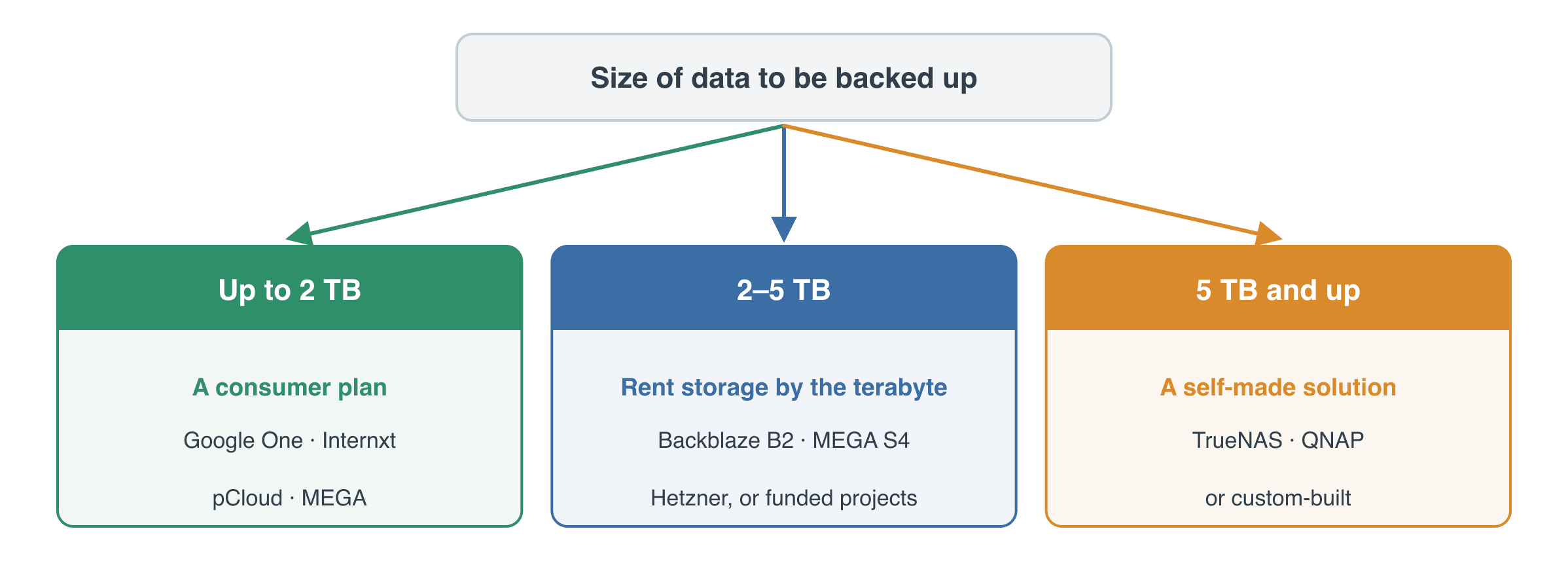
If the slice you’re protecting is small, a few hundred gigabytes, maybe up to a couple of terabytes, the easiest answer is a plan you may already be paying into. Google One, iCloud+ and OneDrive all sell storage by the bucket: around US$3 a month for 200 GB, around US$100 a year for 2 TB. You install the app, point it at the folder, and it keeps a copy in sync. For a modest collection that lives on one computer, that’s the whole job done.
The catch with those three is that they fill quietly with phone photos and email, device backups and so on, therefore the free allowance you imagine you have is often half gone. If you’d rather keep the archive on its own footing, a handful of independents sell dedicated space at keen prices: Internxt at roughly US$24 a year for 200 GB, Proton Drive at about US$48 for the same with stronger privacy, and pCloud at around US$50 a year for 500 GB, or a one-off lifetime payment if you’d rather never see the bill again. MEGA gives 20 GB free and 2 TB for about US$120 a year, with the zero-knowledge encryption it’s known for.
None of these asks anything technical of you. The trade is that they don’t scale gracefully past a couple of terabytes, and most don’t talk to a NAS. The moment your archive lives on a network drive rather than a single computer, you’ve outgrown them, and the next section is where you go.
A lifetime deal and why sync isn’t quite backup
One option in that group deserves singling out, because the maths can be surprising. pCloud sells lifetime plans: a single payment, no recurring bill, with 10 terabytes going for around US$1,190, and often half that in a sale. Set against a twenty-year viewpoint that is genuinely interesting, one-off money like buying a NAS rather than rent that never stops.
pCloud also defines “lifetime” more generously than you might fear: ninety-nine years or your own lifetime, whichever comes first, with no clause that lets the storage lapse if you leave it idle. The one thing it ties to is you, so it’s worth reading alongside Part II’s note on what becomes of an account when its owner is gone.
There is a catch, and it’s worth understanding because it applies to every consumer cloud, not just this one: a service built to sync and share is not automatically a backup. If you mirror a folder and a file is deleted at one end, by you or by software, the deletion dutifully syncs to the other, and on a shared family plan anyone with access can do it. What saves you is version history.
Here pCloud is better than most: a trash that holds deleted files for 30 days, file revisions, a Rewind that rolls the whole account back up to 30 days, and a paid Extended File History add-on that stretches all of that to a year. Notice what that is, though: a recovery window, not a permanent archive. A deletion you don’t know about inside the window is gone, and the add-on won’t bring back anything already purged.
So if you lean on a lifetime cloud as a backup, treat it as a one-way copy rather than a two-way sync, keep it to yourself rather than a shared family folder, turn the longer history on, and never let it be the only copy, it might be worth it.
The bigger-archive answer: Renting storage by the terabyte
For anything larger, or anything sitting on a NAS, the off-site copy usually lives in something the industry insists on calling object storage. It’s an ugly name and you can safely forget it; what matters is the idea. This is storage you rent by the terabyte and pay for by how much you actually use, with no fixed plan to outgrow, closer to renting exactly as much shelf space as your boxes need than to buying a cupboard.
You’ll also see it called S3, which began as Amazon’s version and has become the general word for this kind of professional storage; when a provider says it’s “S4-compatible” or “S3-compatible”, that only means the ordinary backup apps already know how to talk to it. None of the plumbing needs to make sense to you. The one warning is that the setting up is the fiddly part: on a QNAP or TrueNAS box it’s a handful of menu screens, while on a bare computer with free sync software like Rclone it’s more of a small project. It’s a one-time job, and once it’s running it looks after itself.
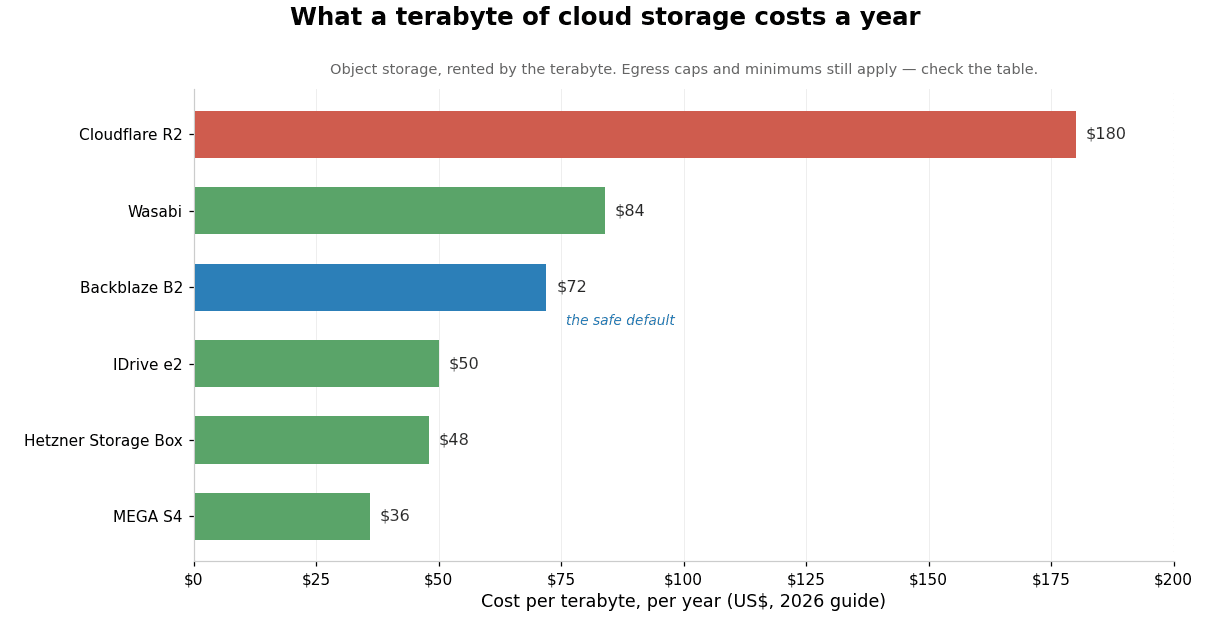
Backblaze B2 is the one I’d point most people at first. It’s plain, reliable storage at around US$6 per terabyte a month, and it lets you pull a sensible amount of data back out for nothing, free up to three times what you store each month, so the day you actually need to restore won’t arrive with a shock bill attached. It’s the most widely supported destination there is, with a native app for every major NAS, and it’s the safe default.
If you want it cheaper and don’t mind a newer name or an overseas datacentre, three options undercut it. MEGA’s S4 storage is about half the price at roughly US$3 a terabyte, with the same zero-knowledge encryption, and being S3-compatible it plugs into a NAS the same way the others do. IDrive’s e2 is similar value at around US$50 per terabyte a year with free retrieval up to three times what you store, the same cap Backblaze sets, and about half the yearly price in your first year. It’s a separate product from IDrive’s consumer backup, and a younger name than Backblaze.
And for anyone in or near Europe, Hetzner is hard to beat. Its Storage Box isn’t S3 at all but plain SFTP and Samba, around €3.80 a month for a terabyte and reached natively by any NAS; if you want S3 proper, Hetzner’s separate Object Storage covers that. All three are sound; the trade is a slightly less established track record than Backblaze’s in exchange for a lower bill.
Two more are worth knowing for the particular case each suits. Cloudflare’s R2 charges more to store, around US$15 a terabyte, but nothing at all to get your data back, which only helps if you expect to pull it back often, and for a backup you don’t. Wasabi sits close to Backblaze at just under US$7 a terabyte, rising to about US$8 from July 2026, with one catch: it bills every upload for a minimum of ninety days, so it suits an archive that mostly sits still and penalises one that churns.
Storj, which spreads your encrypted data across a network of independent operators, was a genuinely interesting option until a US$50-a-month minimum, up from five dollars, landed in July 2026 and priced a family clean out of it.
You’ll still see it recommended in older write-ups; that recommendation has dated.
Those are the names that actually fit a family. There are dozens more, and if you ever want the complete picture I’ve put the full list, sortable and searchable, in a separate reference of backup providers. For most people the handful above are all you need.
The flat-fee unlimited route
Before object storage took over, the home answer was a flat-fee service: one yearly price, an app on your computer, and it quietly backed everything up. A few survive, and they’re as simple as backup ever gets, with no sync software to configure. For one specific situation they’re still the easiest thing going: a smallish archive that lives on a single computer left on most of the time.
Backblaze Personal is the pick of them at around US$100 a year for that one machine and its attached drives, with IDrive’s and Carbonite’s consumer plans covering similar ground. The reason none of them headlines this article is the same reason Part I pushes you toward a NAS: they’re built around a single computer. Backblaze Personal won’t back up a NAS at all, bar a mapped-drive workaround; IDrive and Carbonite can, but through their pricier or business tiers rather than the simple consumer plan. The moment your archive outgrows the one always-on machine, which is the moment it becomes a proper family archive, this whole category quietly stops fitting.
Why cold storage and the enterprise tiers aren’t for families
You’ll come across two more categories while researching this, and it’s worth saying plainly why I’ve left them out.
The first is cold storage: Amazon’s Glacier Deep Archive and the equivalent Archive tiers from Microsoft and Google. On paper they’re astonishingly cheap, about a dollar per terabyte a month, and that number pulls people in. The catch is that they’re built for institutions parking data they’ll almost certainly never read again. Getting your data back takes hours rather than minutes, costs a real fee on top, and runs through developer tooling with no friendly front end. I use Amazon’s cloud myself for other things and still wouldn’t put a family archive in Glacier: you’d be trading a small saving for a restore process that fights you on the worst day of your archive’s life.
The second is the world of enterprise and managed-service backup: Veeam, Datto, the business tiers of Acronis and the like. They’re capable, and they’re simply not aimed at you. The pricing, the licensing and the assumptions all start from an organisation with an IT budget. Worth recognising them for what they are when they surface in search results, but they’re not part of this decision.
Cloud backup for photos and video at a glance
Prices are 2026 guide figures and the market moves quickly, so treat them as the shape of the costs rather than a live quote.
| Provider | Roughly what it costs | Backs up a NAS? | Cost to get your data back | Best for |
|---|---|---|---|---|
| Backblaze B2 | US$6 per TB / month | Yes | Free, within fair limits | The sensible default |
| MEGA S4 | ~US$3 per TB / month | Yes | Free, to 5× stored | The cheapest; newer |
| IDrive e2 | ~US$50 per TB / year | Yes | Free, to 3× stored | Cheap; a younger name |
| Hetzner Storage Box | ~€3.80 per TB / month | Yes | Free traffic | Best value in Europe |
| Wasabi | ~US$7/TB (US$8 from Jul 2026) | Yes | Free (fair use) | Fine, but 90-day minimum |
| Cloudflare R2 | US$15 per TB / month | Yes | Free | Only if you restore often |
| A consumer plan (Google One, Internxt, pCloud) | ~US$20–120 / year | Usually no | App-based | A small archive, no NAS |
| Backblaze Personal | US$99 / year per PC | No — one computer | Posts you a drive | A small archive on one PC |
The full field, including the enterprise and cold-storage tiers I’d steer you away from, is in the separate reference of backup providers.
What’s next
For whether the cloud is even the right call against self-hosting, and what the same archive costs over five, ten and twenty years, go back to the hub: Your off-site backup: the options, and what it really costs. If the numbers there pushed you the other way, the companion piece is Self-hosting your off-site backup: a NAS at a friend’s house. For keeping any of it private, Keeping your family archive out of the wrong hands covers encrypting the copy. The series proper is Part I: Backups and Part II: Preservation, and any unfamiliar terms are in the glossary.