
This is the protection half of the family-archive backup series. The main article raised it in a few lines, under the heading “keeping it out of the wrong hands,” and promised a fuller treatment. This is it. What it takes to keep an encrypted backup of your archive that only the people you choose can read, and a straight account of when that is worth the bother and when it isn’t.
Start with the why, because encryption is a means, not an end, and the right amount of it depends entirely on what you are guarding against. The reasons people want their archive protected run across a wide range, and where you sit on that range decides everything that follows.
At one end are people perfectly content to have their family photos live on a company’s servers, readable in principle by the company and by anyone who breaches it. At the other end are people with concrete reasons to lock things down, whether a wish for privacy as a matter of principle, a public profile they would rather their family weren’t attached to, or an obligation they can’t ignore, such as those whose work forbids them from appearing online at all. Most people sit somewhere between.
Where you sit is your call. But don’t underestimate how real the risks can be, or how readily ordinary people are drawn into harm they never saw coming when their own data or images are turned against them. Those incidents, and how they unfold, are a story in themselves…
First, the wider picture
Before we narrow in: protecting an archive involves more than the backup… There is the master copy on your own machine, which deserves as much care as the copy you send away. There is keeping your home files off the open internet unless you genuinely know what you are doing, the same caution the self-hosting article raises about exposing a NAS. And there is two-factor authentication on the accounts and devices that guard all of it, so a leaked password is not the disaster it otherwise would be. Each of these are a subject in their own right, and may well get its own article in future.
This piece, though, is about the storage side, the copy you keep somewhere else. Two things protect it there. It should travel securely, encrypted in transit, so nobody can read it as it crosses the internet. And it should sit securely at the far end, which the industry refers to as ‘encrypted at rest‘. That second phrase is where the real question hides, because encrypted at rest can mean the company holding your data keeps the keys and could read it whenever it liked, or that only you hold them. Sorting out which is which is the rest of this article.
Who holds the key
There are, in plain terms, three answers to who holds the key, the same three the backup providers list uses in its “keys held by” column. Once you know them, that whole chart reads at a glance.
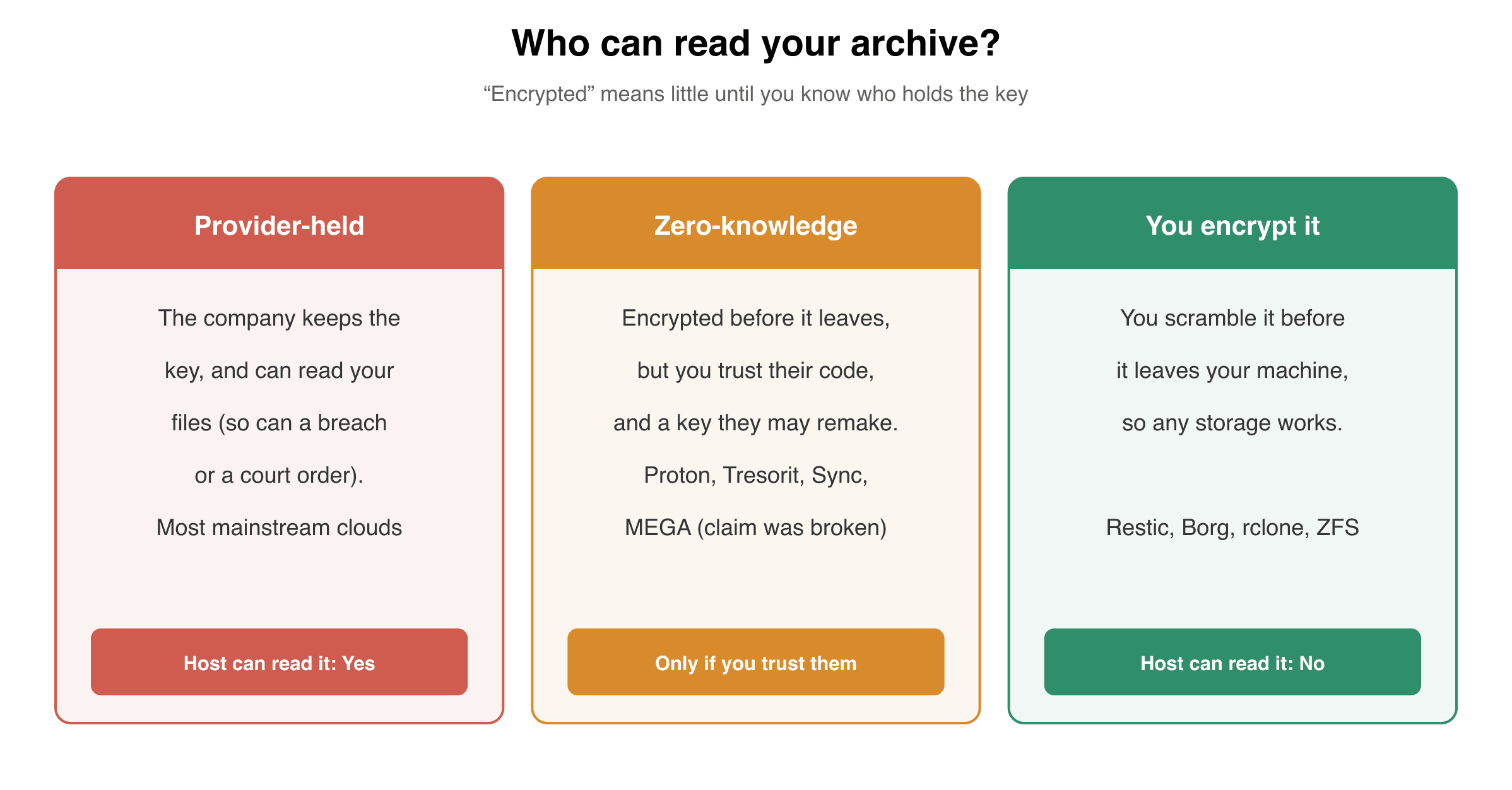
Provider-held. The service encrypts your data but keeps the keys itself. It can read your files when it wants to, which means so can a rogue employee, a court order, or anyone who steals the keys along with the data. Most mainstream clouds work this way, the standard tiers of Google, Dropbox and the rest. The encryption protects you against a stolen disk, not against the company or anyone who can compel it.
Zero-knowledge. The claim is that your data is encrypted before it leaves your device, with a key only you hold, so the company stores bytes it cannot read. It is sold as the strong kind, sometimes called end-to-end.
The useful way to weigh it is to ask one question. They say they do not hold the key. The catch is that you do not hold it either, not in any form you keep on you. So where is it? In a genuine setup it is rebuilt from your password each time you sign in, which is why losing that password, and any recovery code, should lose the data for good. The moment a service can hand your account back without either, the key was within its reach all along, and the promise meant nothing.
And even where the setup is what it claims to be, you cannot check it. The software doing the encrypting is theirs, almost always closed, so you are trusting a black box not to keep a copy of the key or a quiet way in. That trust has been broken in the open. MEGA, which built its brand on exactly this, was shown by researchers in 2022 to be able to recover users’ keys and decrypt their files. So in practice the gap between a zero-knowledge service and ordinary cloud encryption is mostly the wording on the box, and either way you are handing your archive to a company you cannot audit.
If your privacy matters to you, do not take any of this from the marketing. Read independent reviews and audits, and see whether a service behaves any differently from its blurb, before you trust it with your archive. And accept the limit underneath all of it. A key that someone else generated, or can rebuild for you, is not a key only you hold. The one arrangement that escapes the problem is the next one, where you do the encrypting yourself, so the key is yours, and only yours.
You encrypt it yourself. The quietly powerful option. The storage underneath can be the dumbest, cheapest bucket going, because you scramble everything before it gets there, using a backup tool that does the encrypting on your own machine, ZFS, Restic, Borg or rclone among them. Done this way the provider’s promises stop mattering, because whoever hosts your bytes, only you hold the key. It is also how a self-hosted box at a friend’s house keeps your data safe from remote tampering, which the self-hosting article sets out in full.
What this means for each path
Lay those three over the three ways of keeping an off-site copy and the picture sharpens.
If your copy lives in the cloud, privacy comes down entirely to which of the three you have. A mainstream account is provider-held, which is fine if you don’t mind the company being able to read your archive, and not fine if you do. A zero-knowledge service, or a mainstream one with its end-to-end switch turned on, narrows it, as far as you are willing to trust the provider’s code. And if you are renting plain storage and feeding it with your own encrypting tool, you have the strongest position of all, on the cheapest tier going.
If your copy lives on a box at a friend’s house, this is the question that decides whether the whole arrangement sits comfortably. The answer is to send the data already encrypted, with a key that never leaves your house, so your friend stores it but cannot open it. That turns “do I trust them with my photos” into the far smaller “do I trust them to keep a box plugged in.”
And if you have simply handed a drive to family, the same logic applies in miniature. An unencrypted drive is readable by anyone who picks it up, including whoever might one day go through that relative’s house; an encrypted one is a brick without the password. Encrypting a drive before you hand it over is a few minutes’ work, and worth it.
This isn’t paranoia
It is tempting to file all of this under the “unlikely to happen to me” mantra, but cloud breaches are not rare events. They are a steady background hum, and ordinary people’s photos and documents have been swept up in plenty of them. The specifics, the named incidents and why that actually matters (might not be what you think) are a catalogue of their own, and there’s a separate piece coming on exactly that. The short version is that the very tired “I don’t have anything to hide” has been wrong often enough that you should be taking notice of it.
How strong should your encrypted backup be?
Match it to where you placed yourself at the start. If you genuinely don’t mind, provider-held encryption on a mainstream account is a perfectly defensible choice and you can stop here. If you would rather the company couldn’t read your archive, lean on a zero-knowledge service you’ve researched have reason to trust. And if privacy is a real requirement, encrypt the data yourself before it leaves the house, which puts you beyond the reach of any provider, breach or order, on whatever storage you like.
There is one danger that grows as the encryption gets stronger, and it is the mirror image of the protection. If you hold the only key, losing it loses everything, and no company can reset it, because the entire point was that no company could. Zero-knowledge and do-it-yourself encryption ask you to keep the key, or the passphrase behind it, somewhere safe, and somewhere your family could find it if they ever had to. A copy you cannot decrypt is no copy at all, the same lesson as testing a restore, and it bites hardest exactly where the privacy is strongest. So treat the key as part of the backup, not an afterthought to it.
What’s next
This is the protection spoke of the family-archive series. The decision it serves, and the other paths, are in the main article. The cloud options are in Choosing a cloud provider for your family archive, the self-hosted route in Self-hosting your off-site backup, and the whole field, with its “keys held by” column, in the backup providers list. The series proper is Part I: Backups and Part II: Preservation, and any unfamiliar terms are in the glossary of terms.