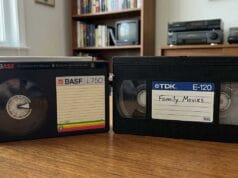

In any VHS vs DVD comparison, DVD wins for watching, because it is sharper, more stable, has better sound and is far more convenient than tape. But neither one is a good format for keeping your recordings safe for the long term. VHS tape degrades, recordable (burned) DVDs suffer disc rot, and the DVD format itself is fading from the devices people own. The single most useful thing to understand is this. Copying a VHS tape onto a burned DVD is a lossy, dead-end step, so if your goal is preservation you should capture the tape to a high-quality digital file instead. That said, a DVD is not always the wrong choice. If you only want the tapes off the shelf and playable in the living room, a disc made on a DVD recorder works fine and may be all you need. The caution is specifically about preservation, where a re-compressed file on a fading, dye-based disc is the wrong home for an irreplaceable original.
VHS vs DVD: what each format actually is
VHS is an analogue format. It records a composite, “colour-under” signal onto magnetic tape, where the brightness (luminance) is FM-modulated and a down-converted colour (chroma) signal sits beneath it. Precision matters here, because the point gets muddled often. VHS is not component video, and it is not a high-resolution carrier. Its actual picture detail sits well below the digital container it usually ends up in. According to Wikipedia’s VHS reference, the format carries roughly 3 MHz of luminance bandwidth and only around 300 kHz of chroma bandwidth, which is why colour on VHS looks soft and smeared.
DVD-Video is digital, and it is standard definition, not high definition. This is another point people get wrong. A DVD is not “HD”. It stores pictures at 720×480 (NTSC, 29.97 fps) or 720×576 (PAL, 25 fps), interlaced, which is 480i or 576i. High-definition optical discs (Blu-ray and HD DVD) did not arrive until 2006. The picture on a DVD is compressed using MPEG-2 at up to 9.8 Mbit/s for the video, as documented by the DVD-Video specification. That compression is the catch we come back to below.
Picture and sound: how they compare for watching
For straight viewing, DVD is the clear winner. Horizontal resolution on VHS sits at around 240 television lines for NTSC, and roughly 290 lines for PAL. DVD’s effective horizontal resolution is roughly 2.25 times that of VHS, so the picture looks sharper and holds far steadier. Both formats share the same standard-definition frame, the 480 scan lines of NTSC or the 576 of PAL, so the real gain is in horizontal detail rather than the number of lines down the screen. That is where the common misconception starts. A DVD is a sharper standard-definition picture, not a high-definition one. There is no tracking to drift, no snow, and no loss of quality each time you press play. DVD also gives you instant chapter access and cleaner audio, free of the tape hiss that VHS carries. (Note that S-VHS is a separate, better tape format that pushed luma bandwidth up to around 400 lines. It is the higher-end cousin, not plain VHS.)
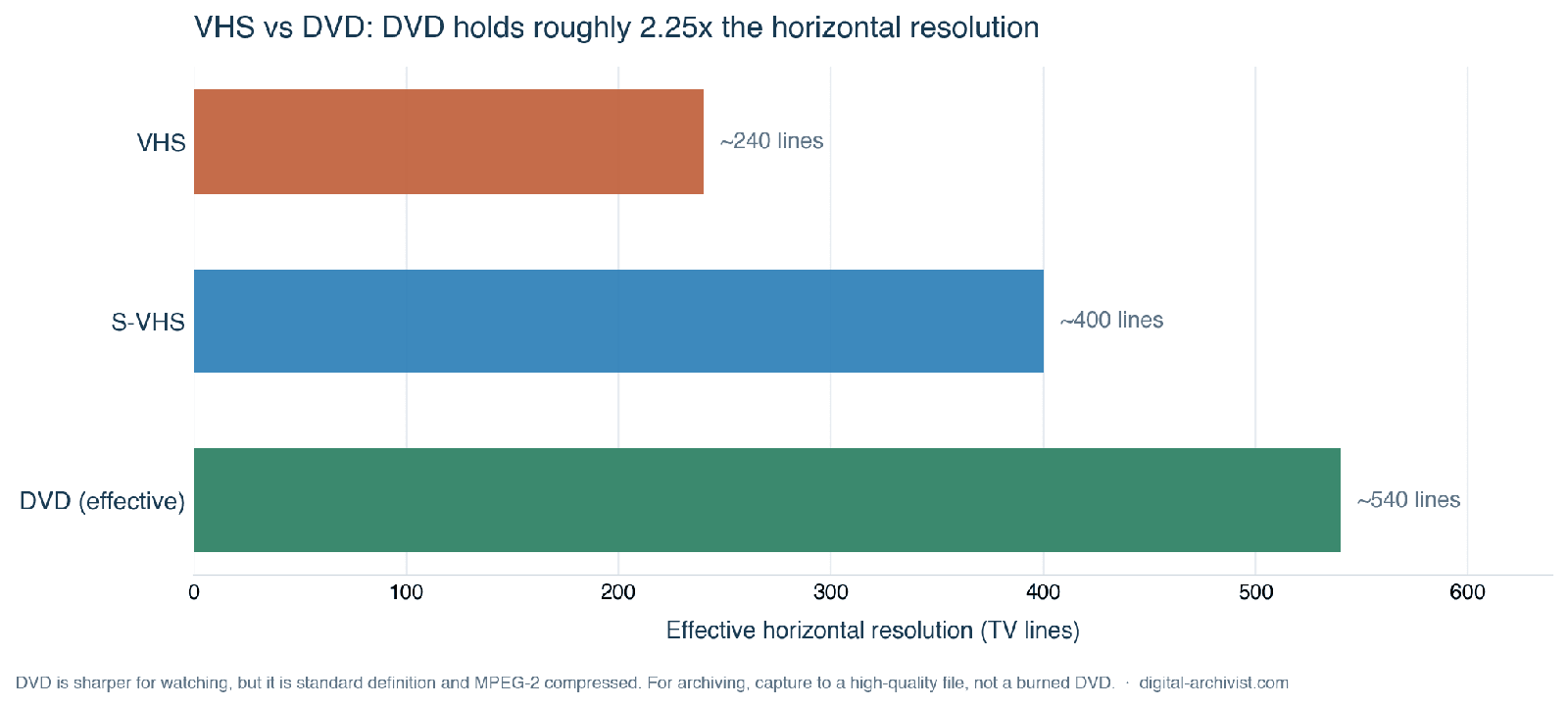
Because DVD uses lossy compression, it has artefacts of its own. Because DVD uses lossy compression, it has artefacts of its own. Macroblocking, mosquito noise and banding all show up, especially at low bitrate or with a poor encoder. A well-mastered DVD comfortably beats VHS, but a badly encoded, low-bitrate DVD can actually look worse than VHS on some footage. DVD quality depends on the source and the encoder, whereas VHS’s limits are baked into the format itself. An analogue tape does store its whole signal uncompressed, so before compression it is not “missing” data the way a starved MPEG stream is. But VHS is already so band-limited and noisy that this rarely makes it look better than a good DVD.
VHS vs DVD for archiving: both are poor
Watching is one thing. Keeping your recordings for decades is another, and this is where both formats fall down. Magnetic tape degrades in ways that are well understood. The oxide can shed, mould can take hold, and heat warps the shell and tape, while every play wears it a little more. The binder can also break down through hydrolysis, the cause of sticky-shed syndrome, though that particular fault is far more common in certain audio and professional tapes than in consumer VHS. For the figures and the storage advice, see our reference on how long VHS tapes last.
Recordable DVDs have a different, equally serious problem. A burned disc is not the same as a pressed one. Factory-pressed discs hold their data in physical pits stamped into the disc, while a recordable DVD stores data in an organic dye layer that the writing laser darkens. That dye is less stable, and the laser’s power drifts as a burner ages, which hurts burn quality over time. This is well covered in the reference on optical disc recording technologies. On top of that, optical discs are prone to disc rot, the slow chemical deterioration that makes a disc unreadable through oxidation of the reflective layer, contaminant reactions, UV damage and de-bonding of the adhesive layers.
The longevity numbers are sobering. The Library of Congress Preservation Research and Testing Division found in 2008 that most recordable CD products have a higher probability of greater longevity than recordable DVD products. The Canadian Conservation Institute, in studies summarised under DVD recordable, reported that under ideal storage a gold-metal-layer DVD-R averaged 50 to 100 years, while the best gold-layer CD-R exceeded 100 years. Those are best-case figures for archival-grade discs in controlled conditions. Ordinary, non-archival discs typically last only 5 to 10 years. Real-world experience backs this up. Cheap consumer DVD-Rs, burned on free drives and handled on a spindle, often fail well inside a decade. Some experienced users disagree, and it’s worth hearing why. Some experienced users argue that dye fade is overstated and that the bigger risk is the player or drive disappearing rather than the disc rotting. Both points hold, and both work against the burned DVD.
No carrier is permanent. Preservation specialists agree that you must migrate your data onto fresh media, regulaarly over time rather than trust any single disc or tape forever. For the bigger picture across all the formats, see how long old media lasts.
Why copying VHS to DVD is a dead end
Putting the two halves together explains why the obvious move is the wrong one. When you copy a VHS tape to a recordable DVD, you take an already-limited analogue source and re-compress it into MPEG-2, adding fresh compression artefacts on top of the tape’s own noise. Then you lock that result onto a dye-based disc that is prone to rot, in a format that is fading from the devices people own. That is two compounding problems baked into a single step, and there is no lossless way back out of it.
It is also worth remembering that DVD is standard definition, superseded by Blu-ray and streaming since 2006, and that DVD drives are vanishing from new computers and players. So a burned DVD is a shrinking-playback-base format as well as a fragile one. You would be committing your memories to a carrier that is getting harder to read every year.
The preservation answer: capture to a digital file
Institutional guidance points firmly the other way. The National Archives and Records Administration (NARA) advises that video preservation copies should be “high resolution, high bitrate, no or very little compression, open or non-proprietary formats”, and treats heavily compressed formats such as H.264 as access copies, not preservation masters. You can read NARA’s video playback and digitisation guidance in full. The Library of Congress Recommended Formats Statement likewise favours uncompressed or lightly-compressed video for preservation.
So the right preservation move is to capture each VHS tape to a high-quality digital file, uncompressed or lossless (for example FFV1 in an MKV wrapper, or a 10-bit capture), kept on managed storage with backups and a habit of migrating to fresh media every few years. That file becomes your archival master. Once you have it, you can make a DVD or an MP4 afterwards as a convenience access copy if you actually want one, without putting your only copy at risk. If you are ready to do this properly, start with our guide to converting VHS to digital.
Frequently asked questions
Is DVD better quality than VHS?
For watching, yes. In a VHS vs DVD picture comparison, DVD has roughly 2.25 times the horizontal resolution, no tracking errors, no loss of quality each time you play it, and cleaner sound. The one caveat is that DVD uses MPEG-2 compression, so a poorly encoded, low-bitrate disc can show macroblocking and in some cases look worse than VHS. A well-mastered DVD comfortably beats VHS.
Should I copy my VHS tapes to DVD?
Not for preservation. Copying to a recordable DVD re-compresses your tape into MPEG-2, adding artefacts, and stores it on a dye-based disc that suffers disc rot in a fading format. Capture each tape to a high-quality digital file instead, then burn a DVD only as a convenience copy if you want one.
Do DVDs last longer than VHS tapes?
It depends on the disc. Ordinary recordable DVDs often fail within 5 to 10 years, sometimes sooner, while archival-grade gold-layer DVD-Rs can reach 50 to 100 years under ideal storage. A well-kept VHS tape can last for decades too, but degrades every time it is played. Neither is a safe long-term home, which is why migrating to a managed digital file is the only reliable answer.
What is the best way to preserve VHS tapes?
Capture each tape to an uncompressed or lossless digital file, following the format guidance from NARA and the Library of Congress, and keep it on managed storage with backups and periodic migration to fresh media. That file is your preservation master. Anything else, including a DVD or an MP4, is just an access copy made from it.