

Pull an old LaserDisc off the shelf, drop it in the player and for the first few minutes everything looks the way you remember. Then the picture starts to sparkle. Coloured speckles drift across the image, thicken over the course of a scene and the sound picks up a faint buzz underneath. That creeping, multicoloured decay is what collectors call LaserDisc laser rot. It is one of the few faults in home video where the disc can look perfect to the eye and still fail and it is also one of the most misunderstood, because the name points at the wrong culprit.
The fault is strikingly uneven. Two discs from the same era, stored side by side on the same shelf and one is pristine while the other is unwatchable. The reason sits in how the discs were built and who built them, not in how they were treated.
What laser rot actually is
A LaserDisc is not one disc. It is two. Each side is a thin sheet of acrylic plastic (not the polycarbonate used in CDs and DVDs), moulded with the microscopic pits that hold the picture and coated with a mirror-bright layer of aluminium so the player’s laser has something to reflect off. Two of those coated sheets are glued back to back with their reflective sides facing inward which makes the single double-sided platter you actually see. The aluminium is sealed in the middle of that sandwich because aluminium left open to air corrodes.
One thing is worth flagging before the failure mechanism makes sense: those pits and lands don’t hold digital data the way a CD’s or DVD’s do. A LaserDisc’s picture is stored as a continuously varying analogue signal, frequency-modulated directly into the length and spacing of the pits. There is no discrete data to protect with an error-correcting code, and Wikipedia notes that this analogue information was never given any built-in checksum or error correction, which is why a speck of dust or a scratch can cause an outright read error rather than something a decoder can silently fix. A player can only conceal a gap like that, never reconstruct it, and that distinction matters for everything that follows.
Laser rot is what happens when that seal fails. When the adhesive bond between the two halves breaks down, air and moisture work their way into the aluminium and it begins to oxidise. The Preservation Self-Assessment Program describes exactly this failure mode for LaserDisc: crazing, a milky white, lattice or spider-web pattern across the surface, is the visible sign that the seal protecting the aluminium core has broken and left it vulnerable to oxidation.
That is oxidation, the same process (also known as laser rot) by which the aluminium loses its reflectivity and the quality of the playback signal degrades. Once the reflective layer dulls, the laser can no longer cleanly tell a pit from the flat land beside it and the picture falls apart.
So the name is a small lie. The laser does nothing to the disc. It reads with a beam of light far too weak to damage anything and a disc that has never been played can rot just as readily as one that has been run hundreds of times. What people call laser rot is a manufacturing and sealing fault that was baked in when the disc was pressed, sitting dormant until the adhesive gives way.
LaserDisc laser rot versus ordinary dropout
Before going further, there is one distinction to get right, because it is where most of the confusion starts.
Dropout or rot? Every LaserDisc has a little dropout. A dropout is a momentary loss of signal, seen as a brief white line or dot flicking through the picture. LaserDisc enthusiasts report the cause as a tiny flaw or pinhole in the pressing, which seems to be corroborated by a contemporary videodisc defect-detection patent that treats exactly this kind of manufacturing-stage flaw as a real problem serious enough to need dedicated inspection equipment. It is present even on a mint, unplayed disc and it never gets any worse.
Laser rot is a different thing altogether. It is progressive, multicoloured speckling that spreads and thickens as the disc ages, driven by the seal failing rather than by a one-off flaw in the pressing. A handful of static white specks is normal. A haze of colour that grows through a scene and gets worse year on year is rot.
Why some discs rot and others never do
LaserDisc had a long and uneven manufacturing history and that history is written into which discs survive. The optical video disc began as a concept demonstrated in 1972 by Philips and MCA. The Computer History Museum dates the format to that demonstration.
The format reached shops as MCA DiscoVision in December 1978, with Jaws the first US release. Philips built the players and MCA pressed the discs. Those first pressings are widely documented as unusually defect-prone and that early reputation is a large part of why laser rot became tied to the format at all. No manufacturer has published the figures, so the specifics are reputational more than an audited record. Even so, the accounts agree that early DiscoVision discs failed at a rate later production didn’t.
Things changed when Pioneer took control. Pioneer’s own corporate chronology records that in January 1980 it showed an optical video disc player for home use at CES in Las Vegas, released the VP-1000 player for the home that June and followed in October 1981 with the LD-1000 and a catalogue of 70 titles. That marked Pioneer’s direct entry into making the discs itself and discs pressed by Pioneer and in Japan earned a reputation as the more consistent tier from this point on. That is reputation rather than a published record, but it is the pattern collectors have seen for decades.
It would be nice to say laser rot was purely an early teething problem the industry grew out of. It was not. Sony’s DADC plant in Terre Haute, Indiana produced laser-rot-affected LaserDiscs well into the 1990s, long after the format had matured — a pattern Wikipedia also confirms, noting that some of DADC’s LaserDiscs exhibit laser rot more than those from other manufacturers. That later recurrence, at a different manufacturer and in a different decade, is the clearest sign that rot tracks specific plants, batches and adhesive formulations rather than the age of the format as a whole.
Is laser rot a myth, like people say about DVDs?
Anyone who has spent time around disc collecting will have heard that disc rot is a myth, an overblown scare aimed mostly at CDs and DVDs. For those formats the argument has some merit, because confirmed rot is far less common than the worry suggests and the mechanisms are different. For LaserDisc, the myth framing does not hold. LaserDisc laser rot is a documented manufacturing fault, and the Preservation Self-Assessment Program describes it specifically for LaserVision and LaserDisc rather than as a vague fear.
The confusion is a matter of language. The term laser rot (and the broader label disc rot) got stretched over the decades to cover CDs and DVDs, where the failure modes are their own thing, dye degradation in recordable discs, thin protective lacquers scratching through, delamination at the edges. Those are legitimate problems in their own right, but they are not the aluminium-oxidation story that defines LaserDisc. I have written about the CD and DVD side separately, in How Long Do DVDs Last, and CDs? Disc Rot Explained, if you want the chemistry of those formats rather than this one.
How to spot laser rot
Spotting rot early is mostly a matter of looking at the disc the right way, before you even reach the player.
- Hold the disc up to a bright light and look across the surface for crazing, the milky white, lattice or spider-web pattern the Preservation Self-Assessment Program describes. It is the visible sign that the seal between the two halves has broken and the core is now open to oxidation and it can show up before playback is affected at all.
- Look for discolouration or a bronze tint across areas of the reflective layer. This can appear early and mildly weaken the signal without being full rot yet, so treat it as a warning rather than a verdict.
- In playback, watch how the speckling behaves. Rot shows as multicoloured speckles that grow denser through the runtime. A few static white lines or dots that never change are ordinary dropout, not rot.
None of these signs are subtle once you know what you are looking at, which is why a bright light and a couple of minutes tell you more than any seller’s description.
Storing LaserDiscs to slow it down
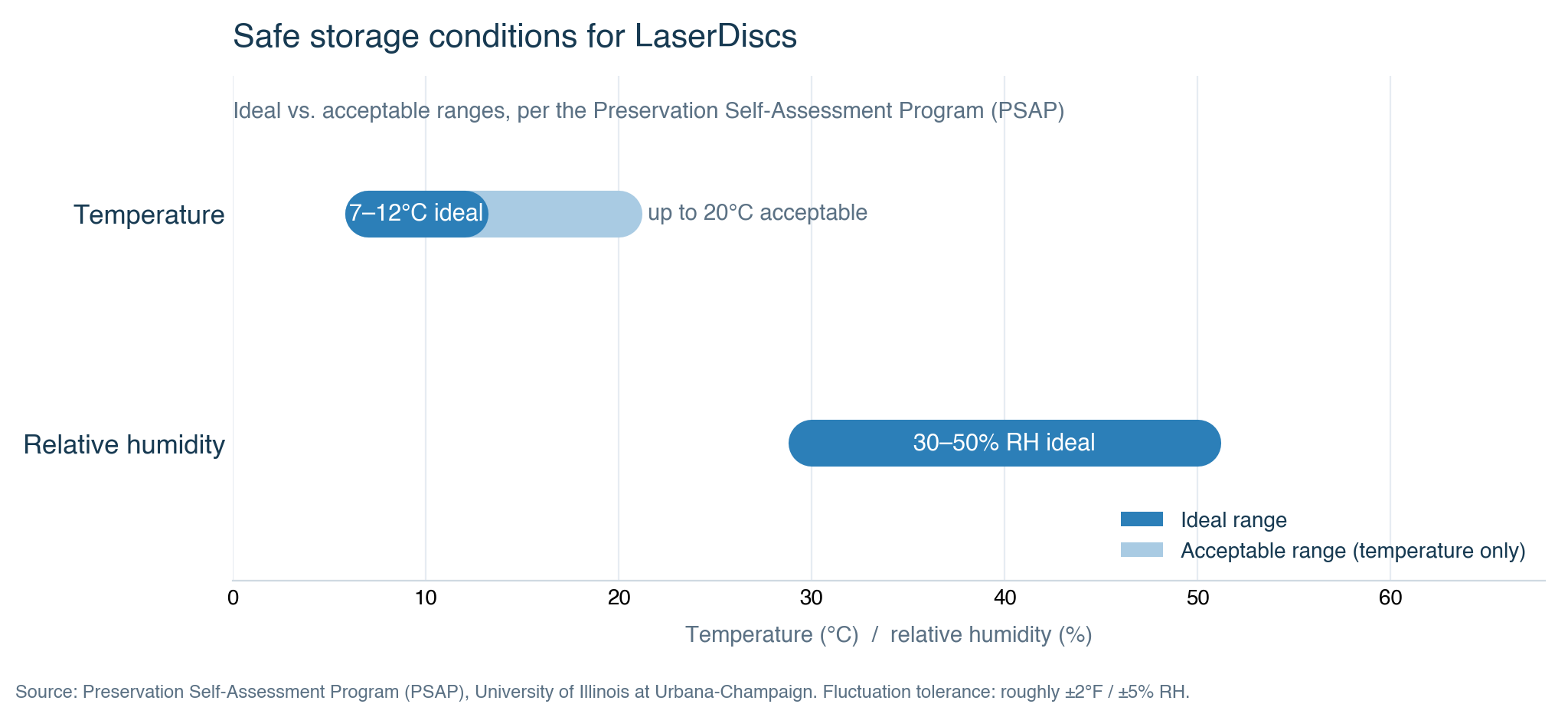
If you want to slow rot down, storage is the one thing you actually control. The Preservation Self-Assessment Program gives concrete targets. It puts the ideal temperature at 45 to 54°F (7 to 12°C), with 55 to 68°F (13 to 20°C) acceptable and ideal humidity at 30 to 50% relative humidity. Just as important as the numbers is stability. It allows a fluctuation tolerance of only about ±2°F and ±5% RH, so a cupboard that swings between hot and cold days is worse than a cool room that stays put.
The Preservation Self-Assessment Program’s handling guidance covers the same ground:
- Store discs vertically, on end, the way you would shelve a book, never stacked flat.
- Keep them in inert plastic cases and away from wood cabinets, which can give off compounds that harm the disc.
- Handle only by the centre hub and the outer edge. Fingers on the information surface leave oils and marks that read as dropout later.
None of this reverses damage that has already started. What it does is buy time on the discs whose seals are still intact, which for a collection is where the effort pays off.
Can a rotted disc be digitised anyway?
Here is where things get more hopeful, a disc that looks rotted is not automatically a lost cause and the reason comes down to how the picture is stored and recovered.
Ordinary LaserDisc players have carried built-in dropout compensation since very early in the format’s life — a 1976-filed patent for a video-disc drop-out compensation circuit predates the format’s December 1978 commercial launch. When the player hits a gap in the signal, it conceals it, filling the hole with information from the line above so the eye does not notice. That concealment is why a rot-affected disc can look watchable on a normal player while the damage underneath still exists. The player is hiding it from you, doing its job.
A different approach skips the concealment entirely. Instead of letting the player decode the disc, you capture the raw radio-frequency signal straight off the disc surface using a dedicated capture board known as a Domesday Duplicator, then decode it in software with the open-source ld-decode toolchain. Because nothing is being concealed, this is both how the rot becomes fully visible and measurable and how it can be partly repaired.
The repair trick is stacking. You capture the same pressing several times, ideally from more than one physical copy of the same disc. Dropout-correction tools then compare the captures and use median stacking to work out, at every point, which copies hold genuine signal and which are showing a rot artifact. Where one copy has dropped out, another copy of the same pressing usually still has clean data at that exact spot and the software rebuilds the correct picture from whichever copy is good.
This is the same family of technique used to rescue analogue tape and I have covered the RF-capture approach in more depth in How VHS Decode Actually Works and in the hardware guide VHS Decode RF Capture Hardware, so I will not re-explain the decode chain from scratch here.
The limits matter before anyone gets too optimistic. If a dropout is present on every copy of a pressing, it is baked into the master itself and no amount of stacking will fix it, because there is no clean source anywhere to copy from. A very badly rotted disc can defeat multi-copy stacking even with several copies to hand. And physical polishing, usually with a plastic polish product, can help with dropout caused by surface scratches or dirt, but that is a different problem entirely. Polishing does nothing for an oxidised reflective layer, because the damage is sealed inside the disc where no cloth can reach.
What no fix can undo
There is a hard ceiling on all of this. Once the aluminium layer has actually oxidised, that oxidation cannot be reversed. No cleaning fluid, no polishing compound and no better player will turn corroded metal back into a mirror. The reflective layer either reflects or it does not and chemistry does not run backwards on a shelf. Any claim that a product restores a rotted disc is describing surface cleaning of scratches and dirt, not a cure for rot.
What the RF-capture and stacking approach can do is recover a usable digital copy from a disc that a normal player can no longer read, provided enough good data survives across the copies you have. That is a genuine rescue and for a rare title it can be the difference between keeping the film and losing it. But it recovers information, not the object. The physical disc stays rotted and the recovery still depends on having more than one good copy of the same pressing. I would not promise anyone that a specific disc is recoverable until it has actually been captured and stacked, because the answer varies disc by disc.
Frequently asked questions
Is laser rot the same as DVD rot?
No. Laser rot on LaserDisc is oxidation of an aluminium layer sealed between two glued discs. CD and DVD failures come from different mechanisms such as dye degradation and thin lacquer coatings and confirmed rot is far rarer on those formats. The name got borrowed, the fault is not the same.
Can laser rot be fixed?
Not by ordinary means. Once the aluminium has oxidised, no cleaning or polishing will restore it. The one route that sometimes works is capturing the raw signal from several copies of the same pressing and stacking them in software to rebuild a clean digital copy, which recovers the content but not the disc itself.
How do I know if a LaserDisc has laser rot before I buy it?
Hold it up to a bright light and look for crazing, a milky white or spider-web pattern across the surface and for any bronze discolouration on the reflective layer. Both are visible before playback is affected. A few static white specks during playback are normal dropout; multicoloured speckling that grows through a scene is rot.
Does every LaserDisc eventually rot?
No. Rot is concentrated in particular manufacturers, plants and eras rather than being universal, which is why two discs of the same age can fare completely differently. Plenty of well-pressed, well-stored discs from the better production runs still play cleanly today.