
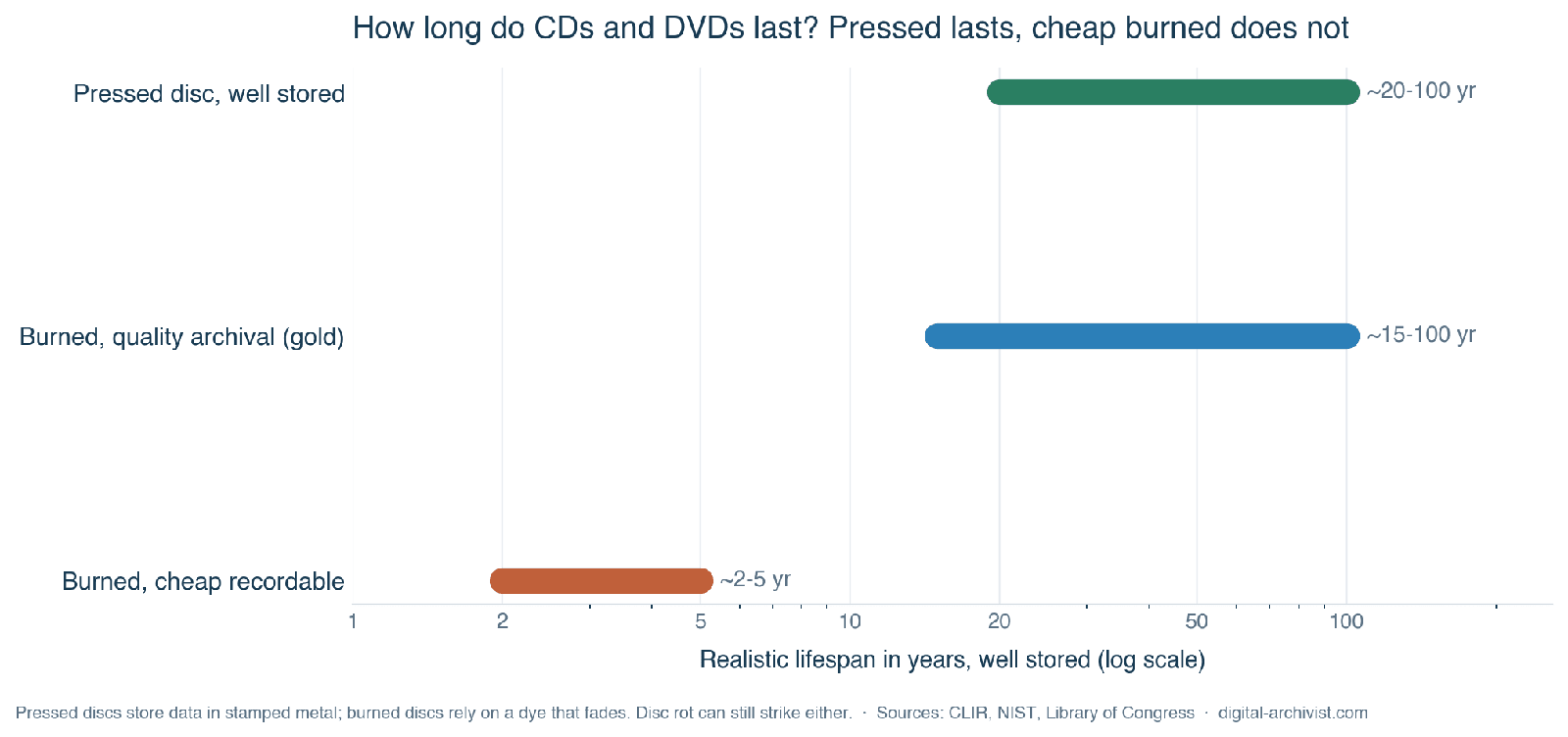
If you are asking how long do DVDs last, the straight answer is that it depends almost entirely on one distinction: whether the disc was pressed in a factory or burned at home. A well-made, well-stored pressed CD or DVD (the kind you buy with music or a film on it) can realistically last several decades, with estimates ranging from roughly 20 to 100 years. A burned recordable disc (CD-R, DVD-R, DVD+R) relies on a fragile organic dye and is far less predictable, with cheap media failing in as little as 2 to 5 years and only the best archival discs approaching a century. The preservation takeaway is simple: never trust a single burned disc as your only copy.
This article explains why the two kinds of disc age so differently, what the institutional life-expectancy figures actually say, what “disc rot” is and how to spot it, and how to store discs so they last as long as they can.
Pressed versus burned: two completely different objects
A pressed disc and a burned disc look identical, but they store data in fundamentally different ways, and that is the single biggest factor in how long they survive.
On a pressed (replicated) disc (a commercial CD-ROM, DVD-ROM, music CD or film DVD), the data is physically stamped into the disc as microscopic pits during manufacture, then backed by a reflective aluminium layer. There is no dye to fade. According to the Council on Library and Information Resources and NIST, the longevity of these discs is governed by how well the aluminium is protected from oxygen and moisture, because moisture and oxygen will eventually reach the aluminium and cause it to lose its reflectivity.
A burned (recordable) disc has no stamped pits. A laser marks an organic dye layer, backed by a reflective layer of gold, silver or silver alloy rather than aluminium. The dye degrades naturally over time and eventually makes the disc unreadable. That degradation is the core reason burned discs are less durable than pressed ones, even when they are stored carefully.
Rewritable discs (CD-RW, DVD-RW, DVD+RW, DVD-RAM) are different again. They use a phase-change metal alloy film that is less stable than the dye in recordable discs, and they are generally not considered suitable for long-term or archival use.
How long do DVDs last according to the standards bodies?
The most cited institutional reference is “Care and Handling of CDs and DVDs” (Fred R. Byers, NIST, CLIR publication 121, 2003). Its figures come with an important caveat: many of the longest numbers are manufacturer accelerated-aging claims, not independently verified results.
- Under recommended storage, manufacturers claim 100 to 200 years or more for CD-R, DVD-R and DVD+R, and 25 years or more for the rewritable formats.
- For pressed CD-ROM and DVD-ROM discs, expectations vary from 20 to 100 years, and Byers stresses that few, if any, independent life-expectancy reports have been published for them.
- NIST’s own accelerated-aging test estimated one type of DVD-R at about 30 years if stored at 25°C and 50% relative humidity, far below the 100 to 200 year marketing figures.
- Unrecorded recordable discs have a claimed shelf life of just 5 to 10 years before recording, so buy blanks as you need them rather than stockpiling.
More recent rankings come from the Canadian Conservation Institute (2019), which placed CD-R with phthalocyanine dye and a gold reflective layer at the top, at over 100 years under ideal conditions. Gold-layer DVD-R came in at 50 to 100 years, and CD-R with a silver-alloy layer at 50 to 100 years, though the silver discs degrade faster if the storage air contains pollutants. For comparison, recordable Blu-ray fares worse: BD-RE at 20 to 50 years and BD-R at just 10 to 20 years. A 2008 study by the U.S. Library of Congress found that most recordable CD products had a higher probability of greater longevity than recordable DVD products.
At the conservative end, the U.S. National Archives and Records Administration lists published life expectancies of 10 or 25 years or more for normal CDs and DVDs, alongside conservative figures of just 2 to 5 years. Manufacturer bodies such as the Optical Storage Technology Association quote 30 to 100 years for DVD formats, and archival-grade vendors have gone further still, with gold CD-R claims around 300 years and Kodak’s Gold Preservation discs once claiming 80 to 300 years.
These numbers do not contradict each other so much as describe different discs. The 300-year claim and the real-world failure in two years are both true, of different media stored in different conditions. The accelerated-aging tests behind the high figures cannot model light, corrosive gases or mishandling, which is why CLIR cautions that it is not always clear how a manufacturer interprets its own end-of-life measurements. Treat the headline numbers as a spread, not an average.
What disc rot is, and what drives it
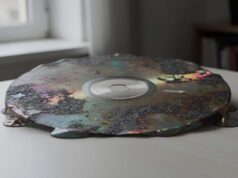
Disc rot is the tendency of optical discs to become unreadable through chemical deterioration, as distinct from ordinary physical scratches. It works through a few mechanisms. The most common is oxidation or corrosion of the reflective layer, where aluminium reacts with oxygen, sulphur and water and loses the ability to reflect the laser accurately. De-bonding or delamination is the adhesive between layers separating, which lets air and moisture reach the reflective layer. On recordable discs, dye degradation breaks down the organic dye until the laser can no longer tell marked areas from unmarked. UV light accelerates dye breakdown and adds heat.
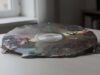
One specific and well-documented form of rot is CD bronzing. A pressing plant in Blackburn, Lancashire produced affected discs between 1988 and 1993, because the lacquer was not resistant to sulphur in the paper booklets, and some discs used a silver rather than aluminium reflective layer. The silver reacted with sulphur to form bronze-coloured silver sulphate. It shows as an uneven brownish discolouring that usually starts at the edge of the disc and works inward, and it affected around 20 mostly-classical labels. The plant ran a disc-replacement hotline for years afterwards. Bronzing is the clearest proof that early manufacturing quality, not just age, can doom a pressed disc. Glue and bonding defects also struck a run of Warner Bros DVDs between 2005 and 2009.
How to spot disc rot
- Hold the disc up to a bright light. Rot shows as pin-prick-sized holes or translucent specks where the reflective layer has corroded away.
- Look for discolouration. Bronze or brown staining like a coffee stain, often starting at the outer edge and creeping inward. On burned discs, look for fading or cloudiness.
- Watch how it reads. Rising read errors, skipping, freezing or scrambled audio, typically affecting tracks near the outer edge first because that is the last-written data.
Every optical disc, pressed or burned, builds in Reed-Solomon error correction at the physical level, so a disc carrying thousands of tiny read errors can still play perfectly. Data discs such as CD-ROMs and DVDs add a second, stronger layer of correction, because one wrong byte in a file matters in a way one wrong audio sample does not. An audio CD instead conceals an error it cannot correct, interpolating across the gap so your ear never catches it. That is the catch. A music CD that still sounds perfect may already be well into decline, while a data disc holds on until the day it abruptly will not read at all. So “it still plays fine” is never proof a disc is healthy, and by the time failure shows, the disc is already a long way down.
What drives degradation, and how to store discs
CLIR ranks the controllable factors in rough order of impact. Humidity is the biggest controllable killer, because moisture carries oxygen and pollutants to the reflective layer. Heat accelerates both aluminium oxidation and dye breakdown. Light, especially UV and direct sunlight, degrades recordable dye. Airborne pollutants such as sulphur dioxide corrode silver layers. Handling damage matters too, and counter-intuitively the data layer in a CD sits just under the label side, protected by only a thin lacquer, so a scratch on the label side is worse than the clear-side scratches people usually fear. Finally, manufacturing quality varies, and because brands source discs from different makers, the name on the package is not a reliable guide to what is inside.
For storage, the recommendations from CLIR and the standards it cites come down to keeping discs cool, dry and dark:
- The guide’s long-term recommendation is roughly 18°C and about 40% relative humidity, with NARA suggesting 20°C and the relevant ISO standards allowing a wider band.
- For archiving recordable discs, choose discs with a gold reflective layer, which is non-corrosive and outlasts silver.
- Store discs upright in jewel cases rather than flat, since lying flat for years can let a disc sag. Keep them out of direct sunlight, and avoid adhesive labels and solvent-based markers.
- Acclimatise discs gradually when moving them from cold storage into a warm room, to avoid condensation.
The preservation point: no disc is permanent
Archiving experts agree on one thing above all: no carrier is permanent, and a real archive has to be actively maintained and migrated rather than burned once and forgotten. This fits the broader pattern across all formats, which we cover in our guide to how long old media lasts. If you are protecting anything that matters, treat optical discs as one copy among several.
- Never rely on a single burned disc. Keep multiple copies on different media, for example a disc plus a hard drive or NAS, and consider an off-site copy through cloud backup for a family archive.
- Verify after burning, and re-check periodically using checksums, because error correction masks decay until it is too late.
- Migrate before the format or the drive dies. Optical drives are vanishing from new computers, and in practice the reader often fails the archive before the disc does.
- If you must use optical for archiving, prefer gold-layer, phthalocyanine-dye CD-R or DVD-R, or an inorganic M-DISC, whose rock-like data layer is claimed to last from 100 to 1000 years. That claim cannot be verified by long real-world testing yet, so keep redundant copies regardless.
There is also a way to build redundancy into the disc itself. The free, open-source tool dvdisaster generates Reed-Solomon error-correction data for a disc, either as a separate file or written onto the disc alongside your data at burn time. It works like a tiny RAID array. If part of the disc later becomes unreadable, the lost sectors can be reconstructed from that parity, within limits. The original project stopped at version 0.79 and is now kept going by a community fork, but it still works and gives an archival burn extra margin of safety.
Frequently asked questions
How long do burned CDs and DVDs last?
It varies enormously with quality and storage. Cheap recordable media has failed in as little as 2 to 5 years, typical non-archival discs are often quoted at 5 to 10 years, and only the best gold-layer, phthalocyanine-dye discs stored in cool, dry, dark conditions approach or exceed 100 years. Because a burned disc depends on an organic dye that degrades over time, you should always keep more than one copy.
What is disc rot and how do I spot it?
Disc rot is chemical deterioration that makes a disc unreadable, separate from physical scratches. The reflective layer corrodes, the layers can separate, or the dye breaks down. To check, hold the disc up to a bright light and look for pin-prick holes or translucent specks, watch for bronze or brown discolouration creeping in from the outer edge, and note any rising read errors, skipping or freezing.
Do pressed CDs last longer than burned ones?
Generally yes. A pressed disc has its data physically stamped into metal with no dye to fade, so a well-stored example can last several decades, with estimates from 20 to 100 years. Burned discs rely on an organic dye that degrades faster and less predictably. The main exception is early manufacturing defects such as CD bronzing, which can ruin a pressed disc regardless of age.
How should I store CDs and DVDs?
Keep them cool, dry and dark. Aim for around 18°C and roughly 40% relative humidity, store discs upright in jewel cases rather than flat, and keep them out of direct sunlight. Avoid adhesive labels and solvent-based markers, handle discs by the edge, and acclimatise them slowly when moving from cold storage to a warm room. For anything you want to keep long term, choose gold-layer recordable discs and keep a second copy on another medium.
How long does other media last?
This is part of a series on how long different formats survive, and what actually shortens their life. The companion guides:
- How long does old media last? — the overview across every format.
- How long do VHS tapes last? — magnetic videotape.
- How long do cassette tapes last? — audio cassettes and reel-to-reel.
- How long does film last? — 8mm, Super 8 and cine film.
- How long do hard drives and SSDs last? — drives, and why digital is not permanent.