
The short answer to how long do SSDs last and hard drives with them, is that neither is built to be an archive. Both are working storage with a service life measured in years, and both can lose data while sitting unused or plugged in. A mechanical hard drive gives you roughly three to five years of reliable service before its odds of an age-related failure start to climb, and it can also seize without warning. A solid-state drive does not wear out from being read, but it has a finite write budget and more importantly for anyone storing files, it slowly forgets data when it is left switched off for long stretches. So a drive in a drawer is a poor archive. What keeps files safe is not a single device but redundancy and active management – several copies, checked regularly, moved onto fresh media every few years.
This is the digital end of the same lesson the site teaches about tape and film. No single carrier lasts forever, so the answer is plural copies plus stewardship, never one disk you trust and forget. If you want the wider picture across every format, start with our reference on how long old media lasts.
Hard drives wear out with age, and can fail without warning
The best public evidence on hard-drive longevity comes from Backblaze, a backup company that has published failure statistics from its own fleet since 2013. Its 2025 analysis covered around 317,230 drives, which makes it the largest real-world dataset of its kind. Across the whole fleet the annualised failure rate (AFR) was 1.57% in 2024, down from 1.70% in 2023. In other words, in any single year the great majority of drives are fine.
The catch is that failure is age-dependent and cumulative. Hard drives follow what engineers call a bathtub curve. The failure rate is higher in the first few months (infant mortality, usually a manufacturing fault), then drops to a low, flat plateau through the middle years, then climbs again as the drive gets old. Backblaze’s own reading of the data is that the failure rate “noticeably increase[s] as drives exceed five years of service,” with a more gradual rise already visible across the three-to-five-year mark.
The good news is that drives are getting better. In Backblaze’s revisited bathtub-curve study, the age at which failures peaked moved out over time, and the peak rate fell. The 2013 data showed a near-textbook curve peaking at about 13.73% around three years and three months. By 2021 the peak was 14.24% at seven years and nine months. By 2025 it was just 4.25% at ten years and three months, with early-life failures barely cracking 1.30%. The trend is clearly towards longer-lived drives.
Two cautions matter for a home archive. First, that is fleet data from a climate-controlled data centre, not a drive carried in a bag or left on a warm shelf. A single consumer drive in ordinary conditions is the right thing to plan around three to five years of dependable service. Second, a hard drive can fail mechanically and suddenly. A head crash or a bearing seizure can take the whole disk in an instant. Drives do give some warning through their built-in self-monitoring (S.M.A.R.T.), but as long-running reliability research has shown, S.M.A.R.T. is not a reliable predictor of every failure, and a drive can die with a clean bill of health. There is one further risk, in an array, the failure of one drive significantly raises the short-term risk of a second failing.
How long do SSDs last, and why a drawer is the wrong place for one
Solid-state drives have no moving parts, so they sidestep the mechanical failures that catch hard drives. Studies generally find them reliable, often outliving their rated lifespan, with failure rates comparable to or lower than hard drives of the same age (Backblaze reported broad parity at equivalent age back in 2021). But SSDs have their own failure modes, and two of them matter for storage.
The first is write endurance. Flash memory cells can only be rewritten a finite number of times, so an SSD’s writing life is rated as TBW (terabytes written) or DWPD (drive writes per day). A consumer drive such as a 1 TB Samsung 970 EVO is rated at 600 TBW. Typical consumer drives span roughly 150 to 600 TBW, while enterprise models run from 3,000 to 35,000 TBW or more. To put 600 TBW in perspective, spread over a five-year warranty that works out to about 0.33 DWPD, which is roughly 329 GB written every single day for five years before you reach the rated limit. For a home archive, where files are written once and then mostly read, write endurance is almost never the thing that gets you. Reading does not wear the drive at all.
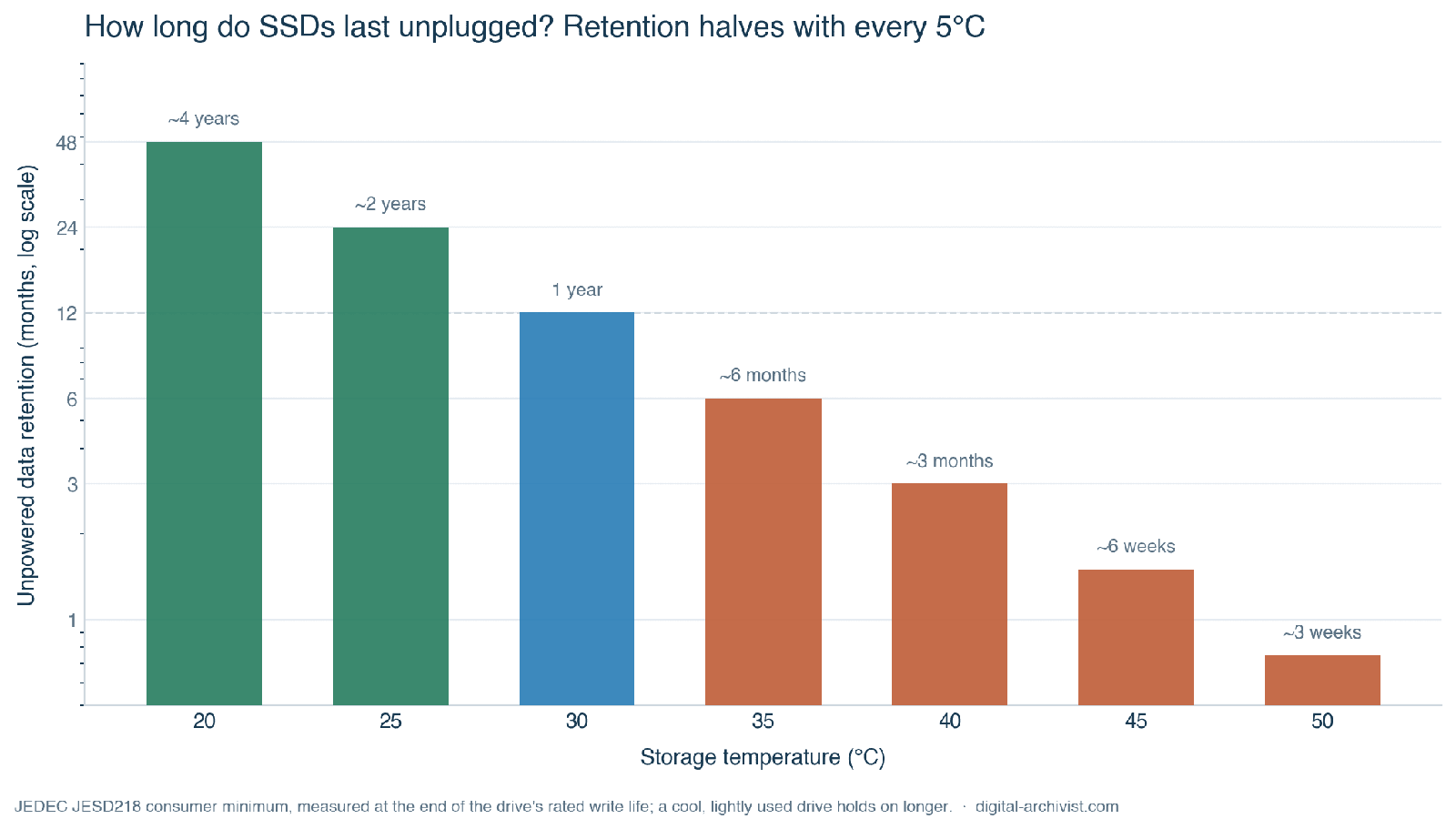
The second failure mode is the truly worrying one, it ruins archives quietly in the background without your realising. An SSD stores each bit as a tiny trapped electric charge, and that charge leaks away over time when the drive has no power. It leaks faster when the drive is warm. The relevant standard, JEDEC JESD218, sets a minimum unpowered retention floor – a consumer SSD must hold its data for one year at 30°C after the power is cut, while an enterprise SSD need only manage three months at 40°C. Those are worst-case minimums measured at the very end of the drive’s rated write life, and a lightly used drive kept cool will hold on a good deal longer. But the relationship is strongly temperature-driven, and roughly every 5°C of extra storage heat halves the retention time, as flash storage testing based on the JEDEC method shows. The practical lesson is blunt. An SSD left unplugged for a year or more, especially somewhere warm, is exactly the wrong place for the only copy of anything you cannot replace.
Why neither drive counts as an archive
Preservation specialists are united on the underlying point: no carrier is permanent. The discipline of digital preservation does not work by finding a “forever” disk. It works by actively moving data onto fresh media over time through refreshing (copying to the same kind of medium before it rots), migration (moving to current formats and hardware), and replication (keeping multiple copies in multiple places). A file survives because someone keeps moving it, not because the disk under it is special.
The Library of Congress puts numbers on this in its personal-archiving guidance. It treats hard disks as realistically usable for about five years under controlled conditions, and advises copying your data onto current storage media roughly every five years. It also advises keeping copies on at least two different kinds of storage media in separate physical locations, and not relying on any single format. That same advice sits behind the institutional frameworks the Library leads, including the National Digital Stewardship Alliance and its “Levels of Digital Preservation,” which formalise exactly these habits of multiple copies, integrity checks and storage diversity.
The fix: 3-2-1, with verification and refresh
The simplest structure for this is the 3-2-1 rule. Keep three copies of your data (one you work from, two backups), on two different kinds of media, with one copy kept off-site. The off-site copy is what saves you from fire, theft or flood taking every disk in one go. We cover how to build this (and other methods) in our guide to designing a family archive that survives you, and the off-site half specifically in setting up an off-site backup.
Three copies on its own is not enough, though. The active part is what makes it work. Schedule a periodic check that compares each copy against a checksum so silent corruption (bit rot) is caught rather than copied into every backup (tip, use ZFS if you can). Plan to migrate your data onto fresh drives every few years, in line with the Library of Congress’s roughly five-year horizon, before the old ones drift into the steep part of the curve. And choose media you will still be able to read in five, ten or fifteen years. Done together, redundancy and refresh beat any single medium. The drive is disposable. The discipline around it is what lasts.
Frequently asked questions
How long do SSDs last compared with a hard drive?
In daily use both are similar, with failure rates broadly comparable at the same age. An SSD will not wear out from reading and typically has plenty of write endurance for a home archive, often outliving a hard drive. The crucial difference is unused: an SSD left without power slowly loses its data (a year at 30°C is the JEDEC consumer minimum), whereas a powered-down hard drive holds its bits but risks the motor or bearings seizing. Neither is a safe place for a sole copy.
How long does a hard drive last?
Plan around three to five years of reliable service for a single consumer drive, after which the age-related failure risk starts to climb. Backblaze’s large-fleet data shows an overall annual failure rate near 1.57%, but on a bathtub curve where failures rise noticeably past five years. A drive can also fail suddenly through a mechanical fault, and S.M.A.R.T. monitoring will not always warn you, so keep more than one copy.
Do SSDs lose data when unplugged?
Yes, slowly. An SSD stores data as electric charge that leaks away while the drive is unpowered, faster when it is warm. The JEDEC standard sets a minimum of one year of retention at 30°C for consumer drives and three months at 40°C for enterprise ones, measured at the end of the drive’s rated write life. A lightly used drive kept cool lasts longer, but an SSD is a poor choice for a disk you write once and shelve for years.
How often should I replace a backup drive?
The Library of Congress suggests migrating your data onto current storage media roughly every five years. In practice, replace or refresh working backup drives every three to five years, verify the copies with checksums when you do, and never let your only backup sit on a single ageing disk. Replacing media on a schedule, before failure rates climb, is cheaper and far less stressful than recovering a dead drive.
How long does other media last?
This is part of a series on how long different formats survive, and what actually shortens their life. The companion guides:
- How long does old media last? — the overview across every format.
- How long do VHS tapes last? — magnetic videotape.
- How long do cassette tapes last? — audio cassettes and reel-to-reel.
- How long does film last? — 8mm, Super 8 and cine film.
- How long do CDs and DVDs last? — recordable and pressed optical discs.